

Trusted Answers, Everywhere
Your team and your AI deserve the same answers.
When metrics are inconsistent, no one wins — not the analyst, not the exec, not the AI tool pulling from the same broken data. PowerMetrics gives every person and every system a single, governed foundation — so decisions are made with confidence, not crossed fingers.

What worked at first has become a
decision-making bottleneck
A few helpful spreadsheets quickly turn into a web of reports, one-off requests, and manual updates. Answers live in different places, numbers don't always match, and every new question means waiting on someone else to pull the data. Over time, confidence erodes — not because the data is wrong, but because no one's quite sure which version to trust.
Independent decisions start with
consistent data
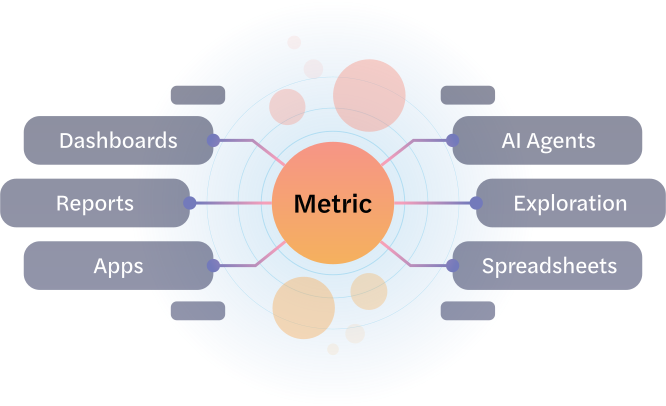
Most teams don't have a data problem. They have a definitions problem — metrics that mean different things to different people, in different tools, on different days. PowerMetrics solves that once, at the source. Define your metrics centrally, govern them carefully, and make them available everywhere your team works. The result isn't just faster answers. It's answers nobody has to second-guess.
Millions of metrics visualized across 90K companies



METRIC OVERVIEWS
Understand every metric, at a glance
Every metric in PowerMetrics includes a ready-made overview — a curated set of visualizations designed to provide context and clarity. Teams can quickly understand definitions, current values, comparisons, trends, and outliers, and optionally customize views or explore further. Metric overviews are a consistent starting point for analysis and a natural bridge to dashboards.
Immediate orientation
Instantly see what a metric means, how it’s performing, and why it matters.
Always current
Metrics reflect the latest available data, so decisions are based on what's happening now — not last week.
Automatic visualizations
Charts and comparisons are generated automatically — no setup required.
Storytelling
Trends, comparisons, and outliers help explain what's happening behind the numbers.

TRUST
Trust every number, everywhere
When people can't trust the numbers, they stop using them — or worse, they use the wrong ones. PowerMetrics ensures every metric is defined once, governed centrally, and expressed consistently across every dashboard, every AI query, and every conversation. Trust isn't a feature. It's the foundation everything else is built on.
Built-in guardrails
Metrics are defined once and protected from accidental edits, so exploration is safe and reliable.
Transparency
Definitions, calculations, and sources are always visible — making metrics easy to understand and verify.
Consistency
Metrics are expressed in familiar business terms with clear calculations, keeping the focus on decisions, not on deciphering data.
Clarity
Metrics are expressed in familiar business terms with clear calculations, keeping the focus on decisions, not on deciphering data.
DASHBOARDS
Curated, DIY, or AI-generated dashboards for every team
PowerMetrics makes dashboards easy to create, manage, and share. Teams can build their own, ask the AI assistant to generate one from trusted metrics, or rely on data and domain experts to curate dashboards for them. Either way, dashboards are simple to navigate, easy to customize with filters and date ranges, and designed to encourage exploration, communication, and action.

AI-generated dashboards
Describe what you want and the AI builds it — governed metrics ensure every visualization is accurate and meaningful.

Context & design
Add narrative, images, and consistent colour themes to align with your brand and tell a clearer story.

Self-serve
Teams can create and customize dashboards independently, without data team bottlenecks.

Presentation flexibility
Versatile metric queries and customizable single- or multi-metric visualizations make for clear and compelling storytelling.

GOALS & NOTIFICATIONS
Make goals visible, and progress unmistakable
Goals and notifications ensure important metrics are actively monitored across the business. Targets, thresholds, and ranges can be defined once, with visual cues like gauges and target lines making progress easy to see and understand. When goals are met or crossed, notifications keep stakeholders informed — drawing immediate attention to issues without manual checks.


Gauges
Visual indicators show how current performance compares to defined goals.

Targets & ranges
Metrics can be measured against clear expectations, thresholds, or acceptable ranges.

Notifications
Automatic alerts surface meaningful changes at the right time.

Shared goals
Goals are shared automatically with everyone using the same metric.
EXPLORATION
A safe place to explore and get real answers
Generic AI tools guess at what your data means. PowerMetrics knows — because every metric it reasons from is already defined, certified, and consistent. That makes exploration genuinely useful: dig into trends, compare scenarios, ask follow-up questions in plain language, and get answers your team can actually act on. No hallucinations. No caveats. No "it depends on how you define it."


AI chat
Natural-language exploration helps teams ask questions and get visual answers—without needing technical skills.

Simple controls
Intuitive filters, comparisons, and visual options make exploration approachable for non-technical users.

Forecasts
Built-in forecasting helps teams anticipate what’s ahead and plan with greater confidence.

Save to dashboard
Explorations can be saved and shared to dashboards, turning one-off questions into ongoing visibility.
AI ASSISTANT
An AI analyst for every user
The PowerMetrics AI Assistant brings a familiar, chat-based interface to analytics — helping business users explore metrics, understand changes, and act with confidence. Ask questions in plain language and get clear, visual answers based on trusted metrics. With built-in account- and user-level context, the assistant feels less like a chatbot and more like a virtual analyst who knows your business.
Conversational self-serve
Ask questions and explore metrics without needing to know where data lives or how it’s calculated.
Visual answers
Get responses as charts, summaries, and links—not just text—so insights are easy to understand and share.
Built-in guidance
The assistant acts like your own personal analyst, explaining why numbers changed and what to look at next.
Personalized context
Account- and user-level prompts help the AI understand your role, goals, and priorities — for relevant, actionable answers.
Recognized as a leader in next-gen analytics
Awarded front runner (Software Advice), high performer (G2), and category leader (GetApp) in Analytics and Business Intelligence.
View our other features
Explore more ways PowerMetrics helps teams trust their data and act on it.
Centralized Control
Keep metric definitions clear, data organized, and access controlled with a single catalog.
AI-Assisted Analytics
Organize around trusted metrics and business context so you can adopt AI confidently.
Connect to Anything
Connect to spreadsheets, services, warehouses, and semantic layers—wherever your data lives.
MCP Server
Connect your AI tools directly to your trusted metric catalog, so every answer is grounded in the definitions, relationships, and context your team already relies on.
