
The Ultimate Analytics Guide For Growth

Summary: Your practical playbook for building a metric-first culture, wiring a lean data stack, and turning live metrics into faster decisions. Learn how leaders ship dashboards people trust, avoid common traps, and get to ROI inside 90 days.
For the modern leader, the challenge is no longer a lack of data—it’s the paralysis caused by too much of it. Most growth-stage companies are "rich in data but poor in insight," trapped in a cycle of manual Excel exports and static slide decks that are out of date the moment they are presented. Waiting until the end of the month to see if a marketing campaign worked or if customer churn is spiking is a recipe for stagnation.
This guide is designed for the data-savvy leader who wants to stop "reporting on the past" and start "steering in real-time." We’ll move beyond the enterprise buzzwords and focus helpful advice that wires your business for speed. Whether you are looking to ship your first real dashboard or refine a maturing stack, this playbook provides the roadmap to get to measurable ROI within 90 days.
1. The high stakes of data (why this guide matters)
Static reports don’t keep up with your business. The gap between data-informed businesses and everyone else has widened into a canyon. The cost of flying blind shows up in missed targets, stalled growth, and waste.
- The survival stat: Companies using real-time analytics are 5x more likely to make faster decisions and 3x more likely to report a significant increase in operational ROI than teams relying on weekly or monthly manual reports (Forrester Research).
- The efficiency gap: Manual data collection (the Excel trap) costs the average mid-sized company over $120,000 per year in lost productivity and errors (Parseur's 2025 Manual Data Entry Report).
- The growth lever: Companies using automated metrics frameworks see a 20-30% improvement in customer retention because they can spot churn signals weeks before customers leave (SuperAGI and Gartner).
"In 2026, the question isn’t whether you have data, it’s whether your data has a heartbeat. Static reports are dead; live metrics are the only way to navigate a volatile market."
Additional proof points worth sharing:
- Data-driven businesses are 23x more likely to acquire customers and 19x more likely to be profitable (McKinsey).
- Strategic business intelligence integration can drive an 80% increase in operational efficiency.
- Organizations with a defined BI framework make decisions 5x faster and can reduce operational costs by up to 30%.
- Twenty percent of small businesses fail in year one. Treat data as an essential for survival in 2026.
- The average company sees measurable ROI within 90 days, with first-year ROI averaging 340%.
What this means: Real-time, well-defined metrics that are shared with your team change outcomes.
2. Establish a “metric-first” mindset
Starting with tools is a common mistake. Start with a meaningful metric. A metric is a business concept with structure, ownership, and a defined action when it moves.
Why a metrics framework matters
A clear framework turns noisy big data into a small, shared story. People across roles can read that story without a translator.
The anatomy of a metric:
- The concept: What outcome are you measuring? For example, “Customer Health.”
- The structure: What inputs feed it? For example, login frequency, open support tickets, average handle time, monthly spend, and tenure.
- The action: What happens when the number moves? For example, if health drops below 65, create a success plan within 24 hours.
Make metrics self-serve. When definitions are plain and consistent, teams don’t need data scientists. They need to be metric-aware. That shift unlocks self-serve analytics, where a marketing manager answers questions in minutes, not days.
Practical moves:
Define once, use everywhere. Every metric needs a single source of truth. Give it a formal name and a clear business definition. Document the underlying formula, the primary data source, and—most importantly—assign an owner responsible for its accuracy.
Set direction and goals. A metric without a goal is just a number. Define whether a "win" means the trend is moving up or down. By setting specific targets, you give the metric direction and enable automated alerts that notify the team the moment a threshold is crossed.
- Contextualize with scenarios. Numbers gain meaning through use. Show your team exactly how to use a metric to make a strategic call. Demonstrate how to segment and filter the data to uncover the "why" behind a trend. When people see how a metric leads to a decision, adoption follows.
3. The lean growth-stage data stack
You don’t need a lakehouse to get value. You need a direct line to insight - starting with what you already have.
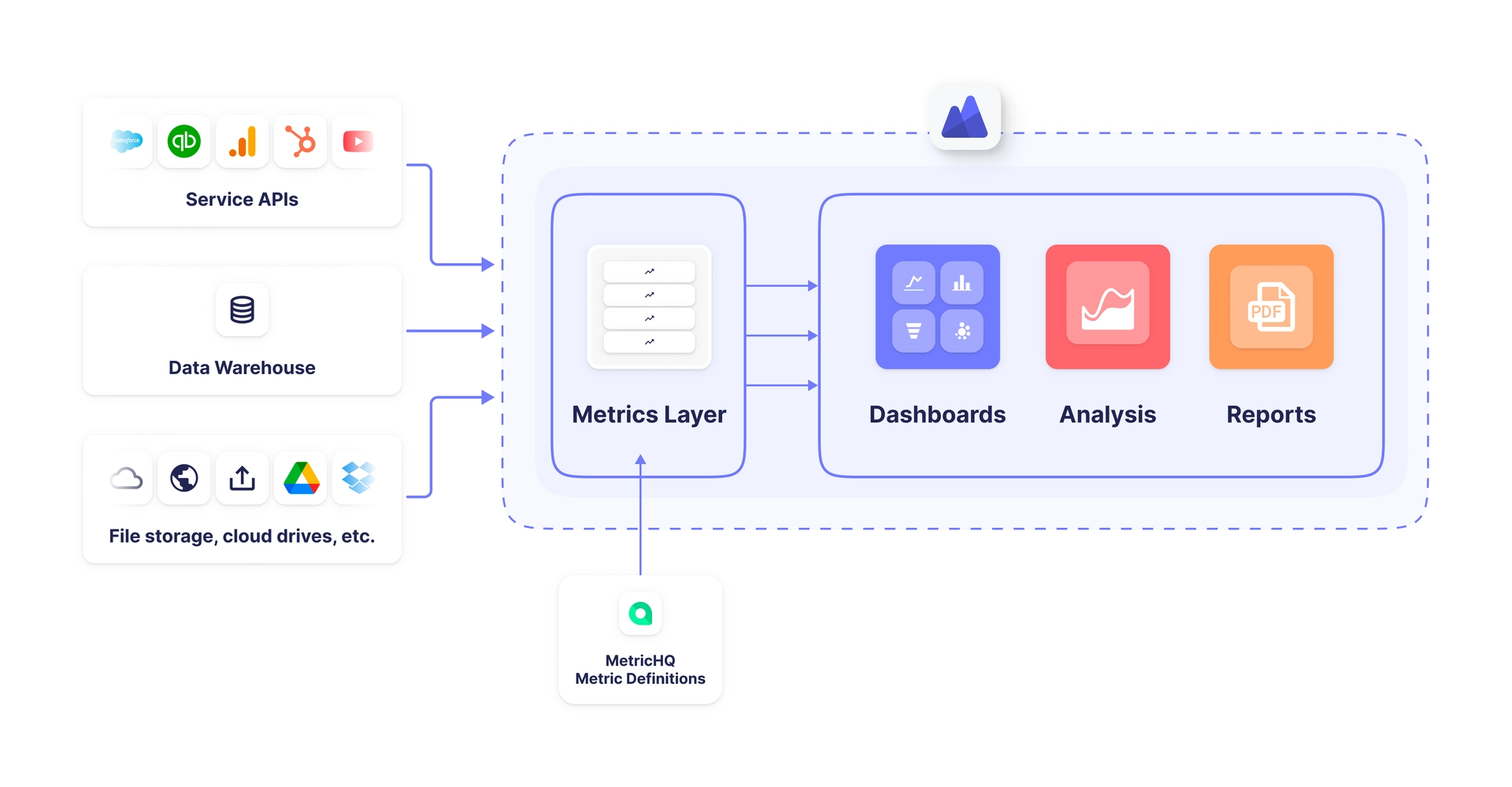
The direct-to-source model
Analytic platforms such as PowerMetrics are excellent at connecting directly to the systems you already use: HubSpot, Shopify, QuickBooks, Zendesk, Google Ads, Facebook Ads, Stripe, MySQL, and more.
- How it works: Connect sources with out-of-the-box connectors or the REST API. Select the fields you care about. Define metrics once, then reuse them across dashboards.
- Why it’s effective: No separate warehouse or complex ETL pipelines to start. Faster to deploy and far cheaper to run.
- Trade-offs to plan for: Direct connections shine for speed and freshness. As maturity grows, you may add a central store for long-term snapshots that some APIs don’t retain.
PowerMetrics brings helpful building blocks:
- Metric catalog and governance: Create, certify, and tag metrics so everyone uses the same definitions.
- Instant metrics and dashboards: Start with popular services and standard KPIs, then tailor.
- Goals and notifications: Track targets and get alerted when metrics cross thresholds.
- History and comparisons: Store metric history to see trends, periods over periods, and cohort shifts.
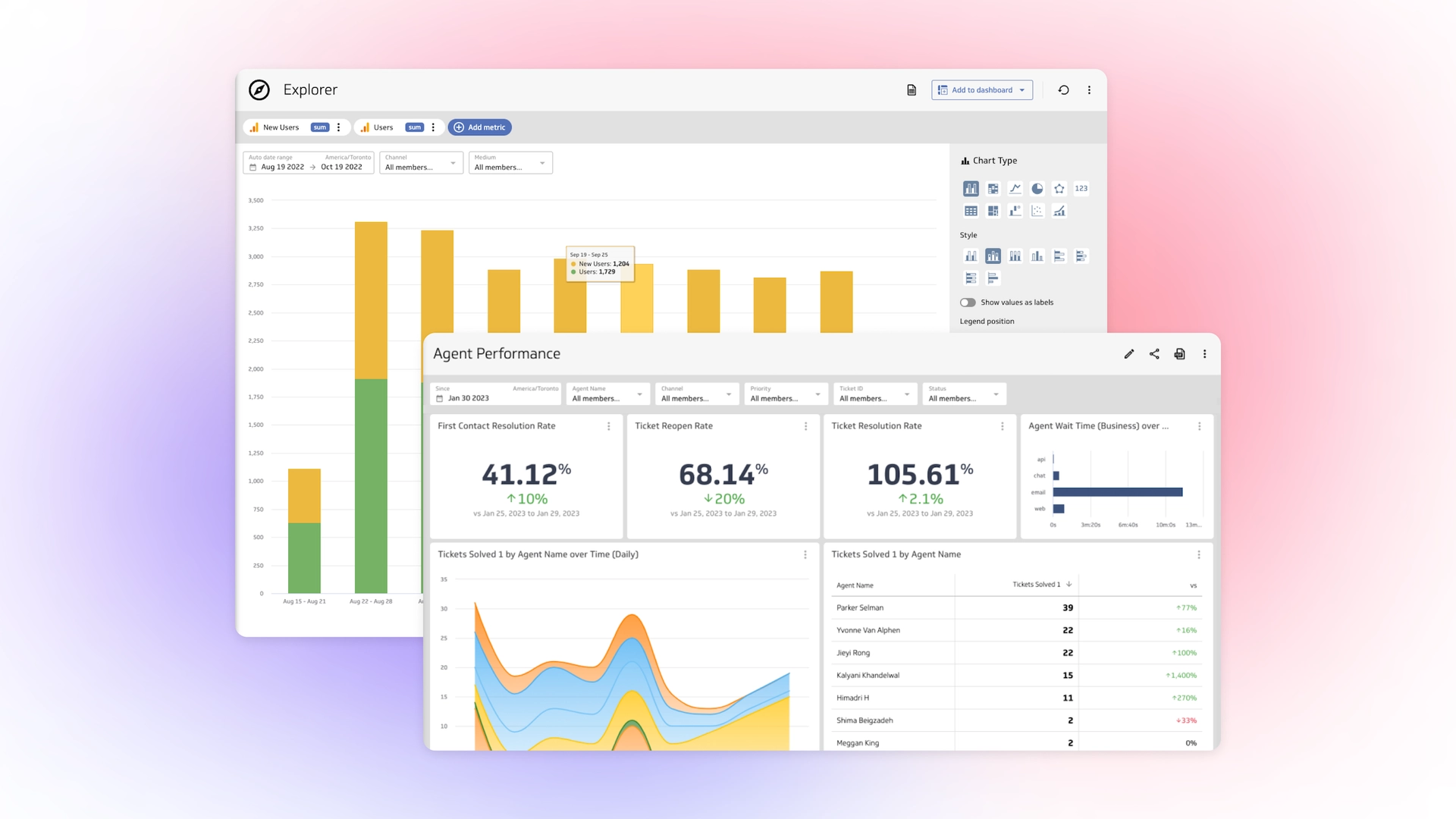
- AI assistance and Explorer: Ask questions in natural language, drill into segments, and explain changes without writing code.
The hybrid storage approach (flexible and future proof)
PowerMetrics simplifies your growth path with a hybrid data approach. You can start by connecting directly to your favourite apps and, as your sophistication increases, seamlessly re-route those same metrics to pull from a centralized warehouse without missing a beat.
- Cloud warehousing: Use pay-as-you-go tools like Google BigQuery or Snowflake for your highest-value, highest-volume data.
- Automated ingestion: Use no-code connectors like Fivetran, Supermetrics, or Zapier instead of custom scripts.
- Right-sizing: Keep the warehouse as a supporting layer. Continue to define and serve metrics in PowerMetrics for speed and access control.
Signals you’re ready to add a warehouse:
- You need multi-year snapshots that source systems don’t provide.
- You’re joining very large tables from several systems and performance matters.
- You require advanced modelling that benefits from centralized storage.
4. Skills for the data-savvy leader
You don’t need Python. You need curiosity and cadence.
- Critical inquiry: Ask, “Is this a trend or an anomaly?” Use PowerMetrics's built in Normal Range visualization to see if things are really outside of the expected. Then check if the time window, seasonality, or a campaign explains it.
- Data storytelling: Translate a 10% drop into a plan sales can execute. For example, “Pipeline coverage fell below 2.5x target. Double outreach to retained accounts and shift budget to the highest-converting campaign.”
- Governance lite: Set the rules of the road so everyone defines “Revenue,” “Qualified Lead,” and “Churn” the same way. Write it down. Certify it in the metric catalog.
- Cadence and ownership: Assign an owner per metric. Review the top 5 weekly. Review the broader set monthly. Tie each red zone to a named person and due date.


5. Implementation best practices and pitfalls
Best practices. Strong rollouts start small. The aim is a visible win that builds trust across the team.
Use these moves to create clarity, speed, and ownership from day one.
- Start with one department. Pick a clear win such as reducing shipping delays or increasing lead conversion. Build a simple metrics framework for that scope first.
- Design role-specific views. A CEO needs a cockpit view across finance, pipeline, retention, and ops. A success manager needs a pulse view of named accounts with alerts.
- Invite your partners. Share metrics with agencies and consultants using secure, published views so everyone steers by the same numbers.
- Make alerts part of work. Notifications should route to the right channel or ticket queue. Add owners and SLAs so action follows signal.
- Ship fast, iterate weekly. Launch a v1 dashboard in days. Add depth as dimensions so users can filter and segment as questions surface.
Common pitfalls. These traps slow teams and erode trust in the numbers. Keep this short list handy as you expand usage across departments.
- Data swamp thinking. Collecting everything because storage is cheap leads to noise. Curate inputs that serve decisions.
- Vanity metrics. Page views and likes are fine, but don’t trade off against “Customer Lifetime Value,” “Contribution Margin,” or “Cash Burn.”
- No monitoring. A dashboard is a map, not the driver. If no one owns a red zone, nothing changes.
6. A 90-day rollout plan
Use this timeline to hit that common 90-day ROI mark.
Days 1-10: Align and define
This phase aligns leaders and locks definitions. Keep scope narrow so you can publish quickly and learn from real use.
- Pick 1 department and 5-7 core metrics.
- Write definitions, thresholds, and owners in the metric catalog.
- Connect 2-3 data sources in PowerMetrics. Validate field mapping.
Days 11-30: Build and publish
Build a usable v1, not a perfect one. Focus on targets, comparisons, and context so people know how to read each tile.
- Create your v1 dashboard. Include targets, comparisons, and notes on how to read each metric.
- Set goals and notifications for red zones.
- Share a read-only view with leadership and frontline teams. Gather feedback.
Days 31-60: Operationalize
Make metrics part of the work. Bring dashboards into the tools people already use and set a review cadence.
- Add role-based dashboards: CEO cockpit, Sales pipeline view, Success pulse board, Marketing performance board, Finance cash and margin view.
- Embed dashboards in the tools people already use or publish a TV view for common areas.
- Document weekly and monthly review cadences. Tie alerts to ownership in your task or ticket system.
Days 61-90: Improve and expand
With a working rhythm in place, widen the lens. Add depth only where it improves decisions or speed.
- Add new metrics that answer recurring questions. Retire ones no one uses (or tag them as "old").
- Introduce cohort analysis for retention and payback.
- Consider a light warehouse layer if you hit snapshot or performance limits.
7. Example metric blueprints you can copy
Feel free to copy these, then adjust to your model and stage.
“Customer Health Score”
Use this when retention matters and you want an early signal for churn risk and expansion potential.
- Purpose: Flag accounts at risk and those ready for expansion.
- Inputs: Weekly login frequency, active users vs seats, open support tickets, CSAT, NPS, MRR, tenure.
- Logic: Weighted composite score from 0 to 100. Red below 65, yellow 65-79, green 80+.
- Action: Red triggers a success plan within 24 hours and an executive sponsor check-in.
“Lead-to-Win Rate”
Use this to watch lead quality and find friction between marketing and sales.
- Purpose: Track conversion quality across the funnel.
- Inputs: Qualified leads, opportunities created, closed-won deals.
- Logic: Closed-won divided by qualified leads for a period.
- Action: If rate drops more than 15% week over week, review lead sources and tighten qualification.
“Contribution Margin”
Use this to keep profitable growth in view during promotions, new channels, and peak demand.
- Purpose: Keep profitable growth front and center.
- Inputs: Net revenue, variable costs such as fulfillment, payment fees, and support per order.
- Logic: (Net revenue minus variable costs) divided by net revenue.
- Action: If margin falls below the target band, pause discount campaigns and review shipping rules.
8. PowerMetrics in action: a short walkthrough
Here’s how a typical setup flows from connection to daily use. Follow this sequence to go from first metric to shared dashboards fast.
- Connect sources. Hook up HubSpot for leads, Shopify for orders, and QuickBooks for invoicing. Use instant metrics or dashboard templates to start with standard KPIs, then tailor the logic.
- Define once, reuse everywhere. Create metrics in the catalog with names, logic, owners, and certifications. Use the same metric across several dashboards so numbers always match.
- Compare periods easily. Toggle on "comparison" to see week-over-week, month-over-month, and year-over-year views.
- Track goals and get alerts. Add targets to key metrics. PowerMetrics sends notifications when a metric crosses a threshold.
- Share securely. Publish read-only views for leadership, teams, and partners. Embed where needed.
9. What to measure by role
Use this as a starting point. Trim to fit your stage. More definitions at MetricHQ.
- CEO cockpit: Cash runway, MRR/ARR, Contribution Margin, Pipeline Coverage, Net Revenue Retention, Hiring plan vs plan, On-time shipment rate.
- Sales lead: Lead-to-Win, Average Sales Cycle, ACV, Pipeline Health by stage, Win rate by segment.
- Marketing lead: Cost per Lead (CPL), Opportunity Creation Rate, Marketing Qualified Leads to Sales Qualified Leads, Campaign ROI, Organic traffic to Lead ratio.
- Customer success: Health Score, Net Revenue Retention, Expansion MRR, Time to First Value, Ticket Backlog and SLA breach rate.
- Ops and finance: On-time shipments, Stockouts, Refund rate, DSO (Days Sales Outstanding), CAC payback, Cash conversion cycle.
10. Keep your metrics honest
Trust comes from clear logic and consistent refresh.
- Certify definitions for shared metrics.
- Track changes to logic in a changelog entry.
- Review metric usage. If you or your team are not using it for a month, cut it or fix it.
- Keep a short glossary. MetricHQ is a helpful reference library when you need standard definitions.
The path forward: From data to decision
Building a metric-first culture isn’t about becoming a tech company; it’s about becoming a more intentional one. By stripping away the complexity of enterprise-grade "data swamps" and focusing on a lean, direct-to-source stack, you give your team the gift of clarity. Remember, the goal isn't to have the most beautiful charts—it's to have the fastest reaction time. Start with one department, define your first five metrics, and get your data’s heartbeat pulse-tested this week.
Your 90-day ROI clock starts now!