
What should a good metric catalog include?
A good metric catalog lists clear names, owners, the current value, a trend line, and business context so your metrics are reusable, trusted, and AI-ready.
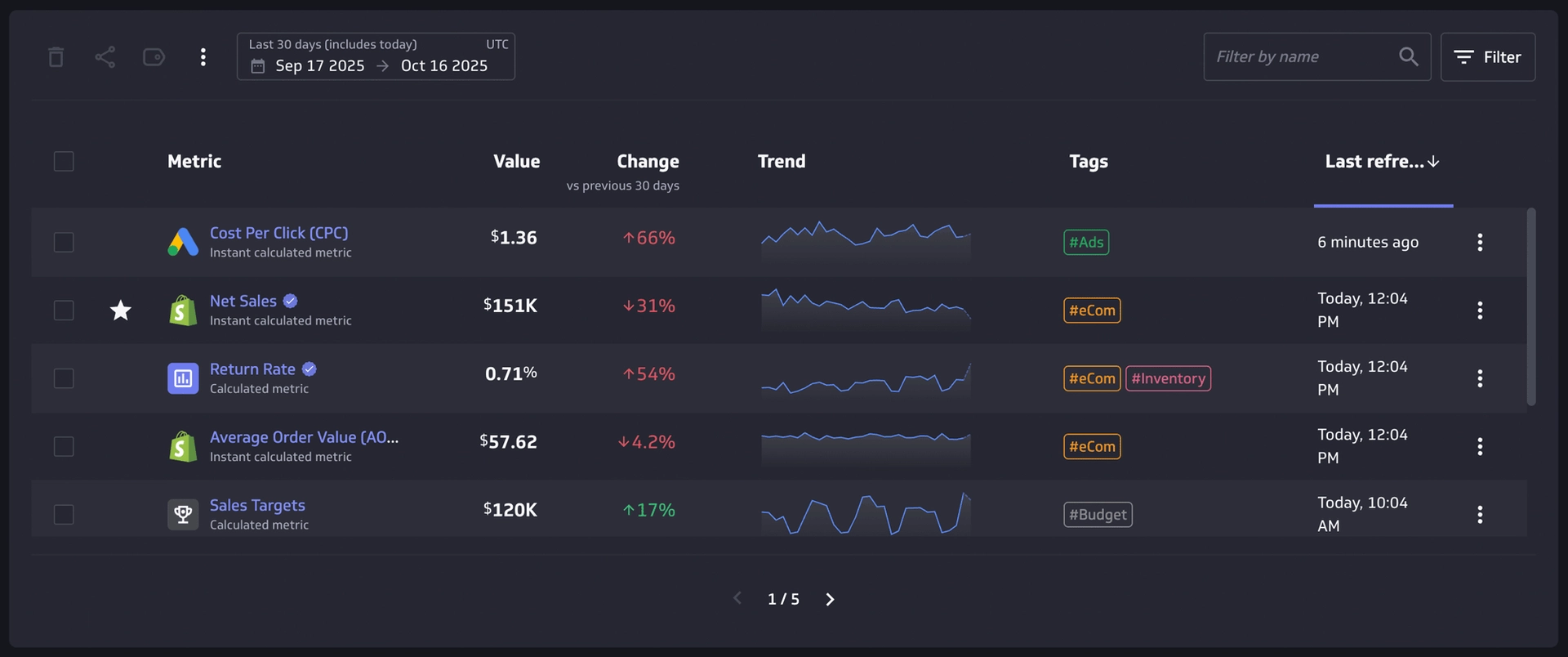
What users should see at a glance
Your metric catalog needs to answer the first five questions every stakeholder has before a click. Keep the surface simple and scan-friendly.
- Metric identity: Name and a short definition you can read in under five seconds.
- Current value: The latest number, with units and currency where relevant.
- Change over time: Delta against the prior period (for example, day, week, month) and the comparison window used.
- Trend line: A small sparkline that hints at direction and volatility.
- Tags and categories: Business function, team, and initiative tags to power search and discovery.
- Freshness: Last refreshed timestamp and a clear indicator if data is stale or at risk.
- Certification and trust: A visible badge for certified metrics so everyone knows what to use in board decks and leadership reviews.
- Personal signals: A star or favourite marker so you can return to key metrics quickly.
Open the "About" panel for depth
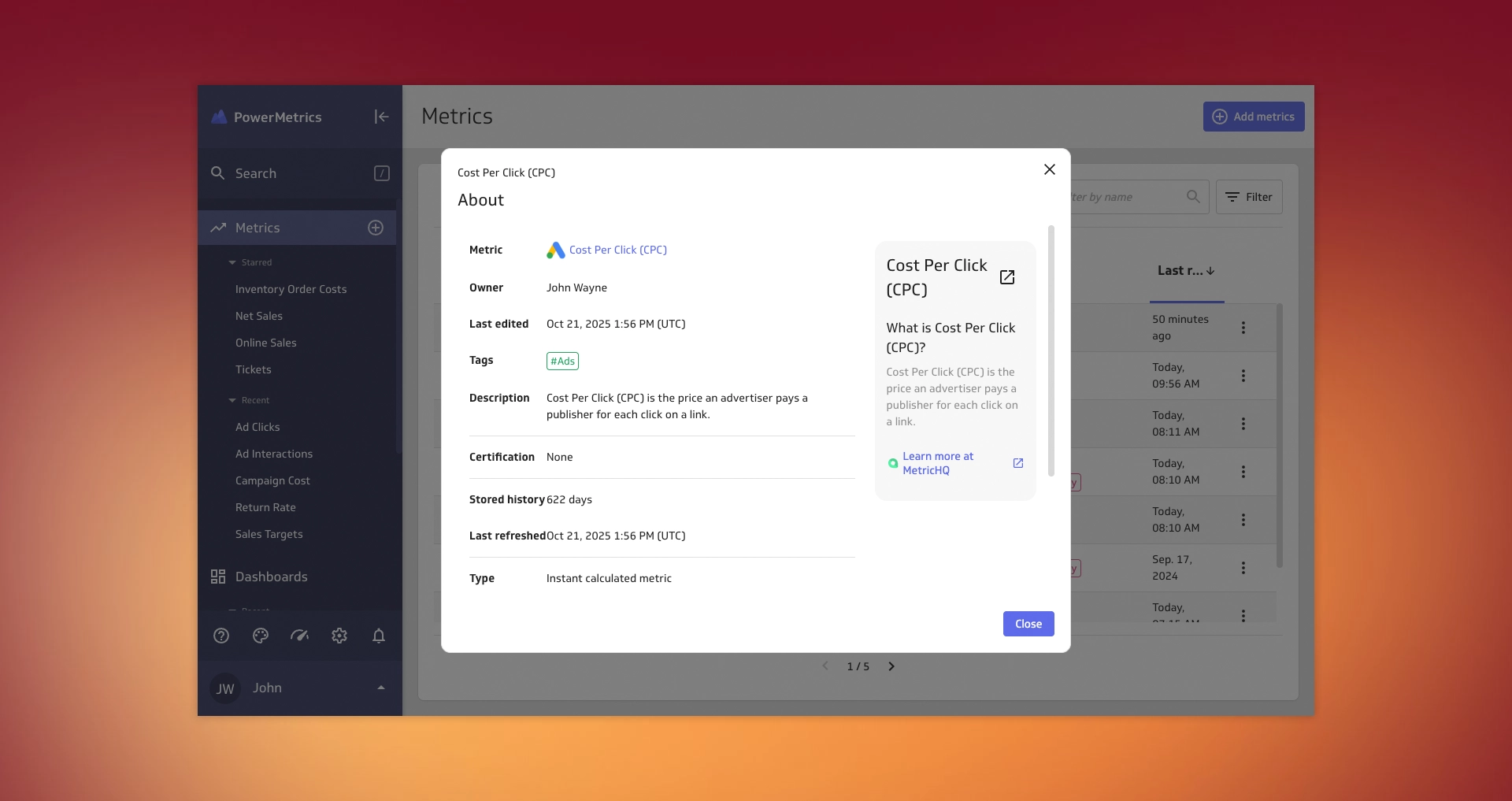
Make rich context one click away in a consistent panel. This is where you help a new teammate understand the metric without a meeting.
- Owner and steward: Named contacts for questions and change approval.
- Last edited: Date and editor, with a short change summary.
- Description: Plain-language explanation that states purpose, scope, and exclusions.
- History window: How many days of stored history are available.
- Refresh details: Source refresh rate and last successful pull.
- Calculation and aggregation: Formula, time grain, filters, and any rollup rules.
- Dimensions and segments: Slice options such as channel, region, or plan.
- Data source and lineage: Where the data comes from and any key transformations.
Organize, search, and manage at scale
A catalog succeeds when busy people can find the right metric in seconds and manage many at once.
- Search that understands context: Find by name, tag, metric type (for example, ratio, count, currency), or data source.
- Useful sorts: Sort by last refreshed, name, or tag for quick hygiene passes.
- Filters and saved views: Keep focused lists like certified financial KPIs for the executive team.
- Bulk actions: Multi-select to share, tag, or delete in batch.
- Keyboard-friendly moves: Fast selection and navigation for power users.
Required vs nice-to-have
Required
- Single source of truth fields: Name, definition, owner, certification state, tags, and unique ID.
- Calculation transparency: Exact formula, time grain, and filters documented.
- Freshness and status: Last refreshed, next refresh, and a simple health state.
- Business context: Purpose, target users, and typical decisions the metric informs.
- Lineage basics: Data source, key transforms, and where the metric appears in dashboards.
- Access and responsibility: Who can edit, who can certify, and who to contact with questions.


Nice to have
- At-a-glance visuals: Sparkline, period-over-period delta, and colour-coded change direction.
- Targets and thresholds: Goal lines and status bands that travel with the metric.
- Related items: Linked "families" like "Revenue," "Net Revenue," and "Revenue per User."
- Usage insights: Last viewed, number of favourites, and where it is embedded.
- Comments and decisions: Lightweight notes for context that outlive Slack threads.
- AI-ready metadata: Clear synonyms, business terms, and consistent units so AI assistants can answer questions accurately.
Examples: weak vs strong metric catalogs
Weak
- Duplicate "Active Users" with conflicting definitions, no owner, and no certification. Search returns a wall of near-duplicates.
- No freshness signal. The current value looks fine, then finance discovers a failed refresh the morning of a board meeting.
- Calculations live in private spreadsheets or notebooks. New hires cannot reproduce results or verify the math.
Strong
- One certified "Active Users" with a clear formula, owner, and related metrics like "Active Users by Plan." Search favours the certified item.
- Freshness badge turns amber after a missed schedule, with a visible next refresh time. Stakeholders know when to trust the value.
- "Gross Margin" shows formula, inputs, and links to the upstream model. Anyone can trace the number back to source systems.
Governance without bureaucracy
Set guardrails that scale, then keep the path to add or update a metric short and clear.
- Define roles: Assign creator, owner, and certifier. Limit certification to a small group.
- Name with intent: Use a short, plain title and a strict suffix pattern like "by Region" or "Rate."
- Adopt a change log: Every edit gets a short note and a version stamp. Keep prior definitions readable.
- Certify with lightweight checks: Confirm definition, formula, source, and freshness. Certify once, review quarterly.
- Publish standards: Required fields, approved dimensions, and formatting rules live in the catalog.
- Set freshness SLAs: Alert owners when a metric goes stale. Pause certification if freshness degrades.
- Sunset policy: Mark metrics as deprecated, link to the replacement, and hide from default search after a grace period.
How PowerMetrics supports metric catalogs
PowerMetrics gives you a curated metric catalog with definitions, descriptions, certification badges, tags, dimensions, and stored history. You can search by name, tag, type, or source, sort by freshness or name, and star favourites for quick access. Owners and certification make trust visible, while refresh schedules and status badges keep freshness clear. Bulk share and tagging speed up maintenance across many metrics.
The platform also connects to 130+ data sources—databases, data warehouses, semantic layers like dbt and Cube, and services—so your metric definitions stay tied to live data. AI-ready metadata means your metric catalog works seamlessly with AI assistants and agents in the flow of work, ensuring every team member and every decision gets the same trusted, consistent answers.
Implementation checklist
Use this to stand up or clean up your catalog in a week.
- Inventory current metrics and merge duplicates. Keep one certified record for each core KPI.
- Fill required fields first: definition, owner, formula, tags, freshness.
- Add at-a-glance elements: current value, delta, sparkline, certification.
- Map lineage and sources so people can trace numbers to origin.
- Publish naming rules and a 2-step certification checklist.
- Turn on alerts for freshness and missed refreshes.
- Create saved views for each team and share links in onboarding docs.
Frequently asked questions
Do all metrics need certification?
No. Certify the small set used in leadership updates and audits. Leave exploratory metrics uncertified, but clearly marked so people know the difference.
How much history should you store?
Enough to capture seasonality and cohort effects. Ninety days is a practical floor for fast-moving teams; one year helps with fiscal comparisons and year-over-year analysis.
What if the same metric lives in another tool?
Keep the catalog entry as the canonical definition and link to the external view. The owner decides which surface is the source of truth, but the catalog should always be the reference point.
How do I know if my catalog is working?
Look for adoption: Are teams using it to find metrics instead of asking in Slack? Are new hires able to answer their own questions? Is freshness improving? If search volume is low or freshness is declining, revisit your naming rules and make sure owners are aware of their responsibilities.