
A metric catalog is the bridge between data and decisions

 Allan WillePublished 2026-02-04
Summary: In most organizations, the greatest obstacle to fast decision-making isn't a lack of data — it's a lack of consensus. When different departments show up to a meeting with different versions of the same truth, progress grinds to a halt. A metric catalog acts as the critical bridge between complex backend data logic and the clear business meaning required by executives and AI. It is the definitive solution for organizations looking to replace metric drift with a shared, trusted language.
The problem: When numbers don't match
Picture this: Sales reports 847 new leads this quarter. Marketing reports 1,203. Finance's forecast assumes 650. Three teams, three definitions, one frustrated leadership meeting.
This isn't a data quality problem — it's a definition problem. Marketing counts anyone who downloads content. Sales counts only prospects who meet budget criteria. Finance counts leads that progressed to qualified opportunities. Each team is technically correct, but the organisation lacks a shared language.
This is metric drift, and it's expensive. Decisions slow down while teams reconcile numbers. New employees spend weeks learning which version of "Leads" or "Revenue" to trust. AI assistants give confident but contradictory answers because they're drawing from different sources. Leadership debates whose numbers are right instead of what actions to take.
A metric catalog solves this by establishing one authoritative definition for each business metric — and making those definitions easy to find, understand, and trust.
What a metric catalog actually does
A metric catalog is a searchable registry of your organisation's business metrics. Unlike a data dictionary that explains database columns or a data catalog that inventories tables and files, a metric catalog focuses on business outcomes: revenue, churn rate, Customer Acquisition Cost, conversion rate.
Think of it as the bridge between the people who build data logic and the people who use the results. Data teams define how metrics are calculated. The catalog translates that technical work into business meaning that everyone — from executives to analysts to AI systems — can access with confidence.
The catalog answers four essential questions
1. What does this metric mean? Clear definitions explain the business concept, not just the formula. "Gross Margin" becomes "Revenue minus direct costs, expressed as a percentage of revenue" — context that helps people understand not just what the number is, but what it represents.
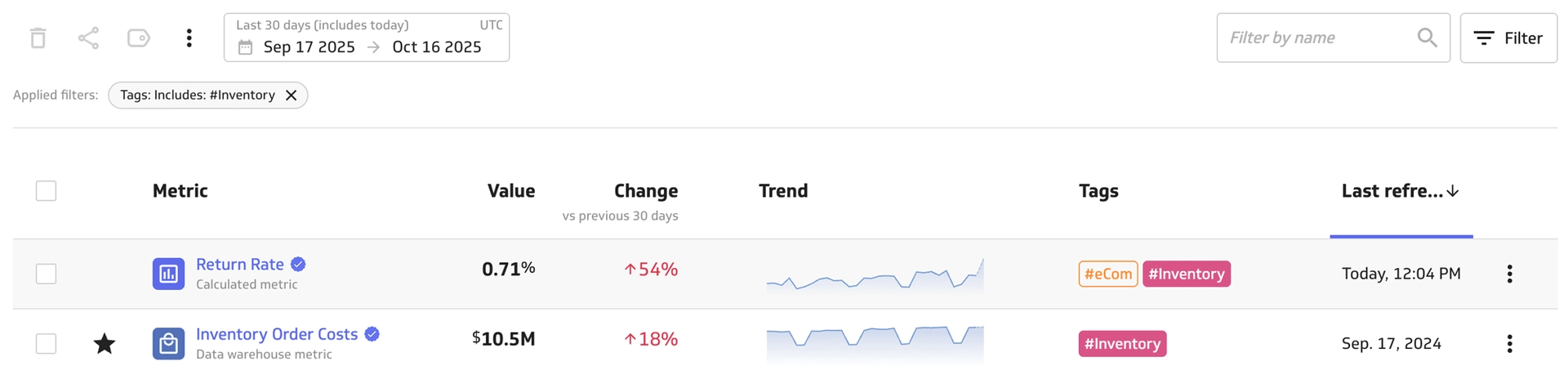
2. Can I trust it? Labels distinguish certified metrics ready for board presentations from draft explorations still being tested. Ownership information shows who's accountable for each definition and who can answer questions. Data lineage confirms that it is sourced from a reputable data feed or warehouse.
3. Is it current? Freshness indicators show when data was last updated — "refreshed 10 minutes ago" or "updates daily at 2 a.m." — so people know whether they're looking at today's reality or yesterday's snapshot.
4. How do I use it? Guidance on common applications, known limitations, and related metrics helps people apply numbers appropriately rather than misinterpreting results or reinventing calculations.
Where the catalog fits in your data architecture
Understanding how a metric catalog relates to your broader data stack clarifies both its value and its boundaries.
Your data flows through several layers before it reaches decision-makers. Raw data sits in warehouses like Snowflake or BigQuery — tables full of transactions, events, and records. A semantic layer (tools like dbt, Cube, or PowerMetrics) transforms that raw data into meaningful calculations through SQL, joins, and business rules. The metric catalog surfaces those calculations in a searchable interface where business users can find and verify definitions. Finally, consumption tools — dashboards, spreadsheets, AI assistants — present those metrics to answer specific questions.
The catalog isn't the engine that calculates results; that's the logic layer's job. The catalog is the front door where people discover which metrics exist, understand what they measure, and verify they're using the right version. It's the difference between knowing that a Customer Lifetime Value calculation exists somewhere in your data warehouse and being able to search for it, see its certified definition, check when it was last updated, and use it with confidence.
This separation matters because it allows different roles to work in their natural environment. Data engineers build sophisticated logic in SQL or YAML. Business analysts search for "churn rate" in plain language. AI assistants read structured metadata to give accurate answers. Everyone works from the same source of truth.
Here's a simple path from raw data to decisions:
- Data storage: Warehouses and apps hold raw tables and facts.
- Logic layer: Technical rules turn raw data into building blocks for analysis.
- Metric catalog: Your teams discover and trust the official definitions.
- Usage: Dashboards, spreadsheets, and AI assistants answer real questions with the same numbers.
The catalog is the bridge between the people who create data logic and the people who use the results. It translates technical work into business meaning.
| Layer | Component | Function |
|---|---|---|
| Storage | Data warehouse (Snowflake, BigQuery, or PowerMetrics) | Stores raw tables and facts |
| Semantic | Metric/semantic layer (dbt, Cube, PowerMetrics) | Defines the logic (SQL/YAML) and joins |
| Discovery | Metric catalog (PowerMetrics) | The searchable interface where users find, verify, and monitor metrics |
| Consumption | BI tools such as PowerMetrics, AI agents, spreadsheets | Where the numbers are actually used |
Who benefits from a metric catalog
Different roles interact with the catalog in different ways, but everyone benefits from the clarity it provides.
Data professionals serve as curators. They publish metrics, review definitions for accuracy and completeness, certify official versions, and manage access controls. The catalog reduces their support burden by answering repetitive questions about metric definitions and cutting down on duplicate dashboard requests. When someone asks "how do we calculate churn?", they can point to the canonical definition instead of explaining it again.
Business teams act as explorers. They search for metrics by plain-language terms, verify they're using certified versions, and apply metrics to real decisions with confidence. The catalog accelerates self-serve analytics by making the right numbers easy to find. A marketing manager can search for "customer acquisition cost," see that Finance owns and certifies it, check that it updated this morning, and use it in planning — all without filing a data request.
AI assistants become reliable consumers. When someone asks an AI tool "how are sales performing today?", the assistant reads the metric catalog to find "Daily Sales," checks its freshness and certification status, and provides an accurate answer with proper attribution: "Sales are up 5% today according to the certified Daily Sales metric, which was updated 10 minutes ago." Without a catalog, the AI might invent a definition, use an outdated metric, or guess at what "sales" means in your context.
Executives and leadership benefit indirectly but significantly. When every team pulls from the same certified definitions, performance reviews become conversations about strategy rather than debates about whose numbers are correct.
What makes a useful metric entry
The quality of your catalog depends entirely on the quality of its individual entries. A well-constructed metric entry provides just enough detail to build trust without overwhelming users with technical minutiae.
The metric name should use plain business language — "Gross Margin," not "gm_pct_v2." This is what people will search for and how they'll reference it in conversations. Follow the metric naming conventions in our companion guide to ensure consistency.
The definition explains what the metric measures in one or two clear sentences. "Monthly Recurring Revenue: The normalised monthly value of all active subscriptions, excluding one-time fees and usage charges." Simple, precise, unambiguous.
Scope and filters clarify what's included and excluded. Does "Revenue" include taxes? Are refunds subtracted? Which geographic regions are counted? These details prevent misinterpretation and reduce the "but I thought it meant..." conversations that derail meetings.
Ownership assigns accountability. Every metric needs a person or team responsible for its definition — someone who can answer questions, approve changes, and ensure the metric serves its intended purpose. Without clear ownership, metrics drift as different teams make uncoordinated adjustments.
Status indicators show where each metric stands in your governance process. A "Draft" tag signals experimentation. "Certified" indicates the official version approved for formal reporting. "Deprecated" warns that a metric is being phased out, usually with a link to its replacement. These simple labels prevent people from accidentally using outdated or unofficial definitions in important decisions.
Freshness metadata sets expectations about currency. Some metrics update in real time. Others refresh overnight or weekly. Displaying the last update time — "Updated 10 minutes ago" or "Refreshes daily at 2 a.m. ET" — helps people assess whether the data is current enough for their purpose.
Usage guidance provides context that pure definitions can't capture. When is this metric most useful? What are common pitfalls? Are there seasonal patterns to consider? This narrative guidance transforms a number into a decision-ready asset.
Related metrics create navigational pathways. Someone looking at "Gross Margin Percentage" might also need "Gross Profit," "Revenue," or "Cost of Goods Sold." Surfacing these relationships helps users build complete analyses rather than working with isolated numbers.
Together, these elements answer not just "what is this metric?" but "can I trust it?" and "how should I use it?"
How governance actually works
The word "governance" often conjures images of burdensome approval processes and bureaucratic committees. Effective metric catalog governance is nothing like that. It's a lightweight framework that maintains quality without slowing down innovation.
Intake is simple and open. Anyone can propose a new metric through a brief request that captures the metric name, its business purpose, who will own it, and a draft definition. This low barrier encourages teams to document metrics they're already using rather than working in shadow spreadsheets.
Review focuses on clarity and consistency. A small group — often data team members with business stakeholders — checks new submissions for duplicates, naming consistency, and definitional clarity. This isn't about gatekeeping; it's about preventing the catalog from becoming cluttered with redundant or confusing entries.
Certification signals readiness. Approved metrics receive a "Certified" badge and appear prominently in search results. Teams still have room to test ideas — certification simply marks the metrics you'd feel confident presenting to the board or embedding in AI-powered tools.
Versioning creates accountability and continuity. When definitions change — and they will, as businesses evolve — the catalog logs what changed, when, why, and who approved it. This audit trail helps people understand why numbers might look different from last quarter and builds trust that changes are deliberate.
Deprecation provides a graceful exit. When metrics become obsolete or are replaced by better versions, they're marked "Deprecated" with a clear pointer to the replacement. This preserves historical context without confusing people who might accidentally use outdated definitions.
Most metric approvals happen in minutes, not weeks.
The anatomy of a strong example
Consider "Revenue" — seemingly simple, but often a source of confusion.
- Definition: Money earned from customer purchases during the period, net of refunds and excluding taxes.
- Inclusions: Product sales, subscription fees, and usage-based charges from paying customers.
- Exclusions: Sales taxes, VAT, gift card redemptions (counted when redeemed, not when purchased), and processing fees.
- Calculation: Sum of all completed transactions minus refunds processed during the same period.
- Available segments: Channel (direct, partner), product line, country, sales representative, customer segment.
- Data history: Full history retained for 4+ years.
- Owner: Finance Operations team.
- Status: Certified.
- Last updated: 10 minutes ago (refreshes hourly).
- Usage notes: Use this metric for financial reporting and planning. For sales performance analysis, consider "Bookings," which includes committed but not yet recognised revenue. During the first week of each month, this metric may show higher refund rates as they're processed in batch.
- Related metrics: Gross Revenue, Net Profit, Average Order Value, Bookings.
Even this relatively straightforward metric benefits from explicit documentation. The entry clarifies edge cases, sets expectations about freshness, provides context for appropriate use, and connects to related concepts. Someone encountering this metric for the first time — or an AI assistant parsing it programmatically — has everything needed to use it correctly.


Common pitfalls and clarifications
As organisations implement metric catalogs, several misconceptions regularly emerge.
"This is just a fancier data dictionary." Data dictionaries explain technical assets: what the "cust_id" column means, which table contains order data, how fields are encoded. A metric catalog explains business concepts: what "Churn Rate" means, how it's calculated, when to use it. Business users don't think in terms of database schemas — they think in terms of outcomes and performance indicators.
"We already have a data catalog." Data catalogs inventory assets — tables, files, dashboards, data pipelines. They're essential for data governance and lineage tracking, but they're organised around technical resources, not business questions. A metric catalog sits at a higher abstraction layer, focusing on the metrics that drive decisions. The two are complementary, not redundant.
"Our semantic layer already does this." Your semantic layer (dbt, Cube, LookML) defines the calculation logic — the SQL and business rules that generate metric values. The metric catalog makes those calculations discoverable and understandable to non-technical users. Think of the semantic layer as the engine and the catalog as the interface that shows what the engine can do.
"This will slow down our analysts." In practice, the opposite happens. Analysts spend less time answering the same definitional questions and more time doing actual analysis. They publish once, certify the definition, and point people to the catalog when questions arise.
Measuring catalog maturity
Not every organisation needs — or is ready for — a fully featured metric catalog. Understanding where you are helps you choose the right next step.
Level 0: Ad hoc chaos. Metrics live in slide decks, personal spreadsheets, and tribal knowledge. Meetings regularly devolve into debates about whose version is correct.
Level 1: Basic catalog. You've established a shared location for metric definitions — maybe a wiki, a shared document, or a simple database. Metrics have owners and descriptions. People know where to look first instead of starting from scratch.
Level 2: Certified catalog. You've implemented clear governance. Metrics carry status badges. There's minimal duplication. Dashboards pull from certified metrics by default. Leadership meetings shift from "whose number is right?" to "what should we do?"
Level 3: Connected catalog. AI assistants and analytics tools read catalog metadata — status, freshness, ownership — to provide contextual answers. When someone asks "what's our current MRR?", the system retrieves the number and explains it's from the certified Monthly Recurring Revenue metric, updated this morning, owned by Finance. The catalog becomes infrastructure that powers intelligent tools.
Use this maturity framework to assess where you are and identify the highest-value improvements, not as a scorecard.
Practical quality standards
Maintaining catalog quality doesn't require elaborate processes, but it does require consistency around a few key dimensions.
Freshness targets should match business rhythm. Critical operational metrics might update every few minutes. Financial metrics often refresh daily or weekly. The key is setting clear expectations and meeting them reliably. When a metric that's supposed to update hourly hasn't refreshed in six hours, surface that to users so they don't make decisions on stale data.
Accuracy starts with spot checks, not comprehensive testing. During the review process, verify that metric values align with source systems for a few sample scenarios. Document edge cases and assumptions in the metric notes. You're building confidence, not proving mathematical perfection.
Completeness means covering the segments that matter. If your business operates across multiple product lines or regions, verify that metrics can be segmented appropriately. A "Revenue" metric that can't be broken down by product line might be technically correct but operationally useless.
Naming consistency prevents fragmentation. Follow clear conventions — the ones outlined in our companion guide — so that people develop reliable mental models. When every metric follows the same patterns, search becomes intuitive and browsing becomes productive.
Change documentation creates continuity. When definitions evolve, explain what changed and why. "Updated to exclude tax from Gross Revenue calculation (previously included) to align with GAAP reporting standards. Approved by Finance, effective Q1 2025." This context helps people understand why historical comparisons might look different and builds trust that changes are deliberate.
Two scenarios that illustrate the value
Scenario A: Ending the revenue debate
The problem: The executive team receives two different revenue reports every Monday. Sales and Finance both pull from the data warehouse, but Sales' number is consistently 3–8% higher. Leadership spends the first 20 minutes of each meeting reconciling the difference instead of discussing strategy.
Investigation reveals that Sales includes pending invoices that haven't been paid. Finance counts only recognised revenue according to accounting standards. Both teams are technically correct for their purposes, but the organisation lacks a single version for executive reporting.
The catalog intervention: Finance publishes a certified "Revenue" metric with explicit notes: "Revenue recognised under accrual accounting, excluding pending invoices and refunds. Use this for financial reporting and board presentations." Sales creates a separate "Bookings" metric for their pipeline management, clearly distinguished from recognised revenue.
The result: Executive reports reference the certified Revenue metric. Sales continues using Bookings for their internal processes. The confusion disappears because the boundary between metrics is explicit. Monday meetings start with strategy, not number reconciliation.
Scenario B: An AI assistant that stays on script
The problem: Your organisation has deployed an AI assistant to help teams answer analytical questions. When someone asks "How are sales today?", the assistant sometimes returns daily revenue, sometimes monthly revenue, and sometimes the count of closed deals — depending on which data it happens to access.
The catalog intervention: The data team publishes three distinct certified metrics: "Daily Revenue," "Monthly Revenue," and "Closed Deals." Each entry includes a clear description, freshness indicator, and suggested use cases. The AI assistant is configured to read the catalog and prioritise certified metrics.
The result: When someone asks the question, the assistant responds: "Today's revenue is $127,450, up 5% from yesterday, according to the certified Daily Revenue metric. This data was updated 10 minutes ago and includes all completed transactions minus refunds." The answer is accurate, attributed, and contextualised — because the assistant drew from well-documented, certified definitions rather than guessing.
Choosing the right foundation
If you're building or buying a metric catalog, certain capabilities separate useful tools from frustrating ones.
Search must handle natural language. People don't search for "rev_net_m" or "metric_id_4729." They search for "revenue," "sales," "customer churn," or "conversion rate." Your catalog needs to support plain business terms, synonyms, and even common misspellings.
Ownership and status must be immediately visible. When someone finds a metric, they should instantly see whether it's certified or experimental, who owns it, and when it was last updated. These trust signals determine whether people will use the metric or keep searching for "the real version."
Freshness needs to be automatic, not manual. Stale metadata is worse than no metadata because it creates false confidence. Your catalog should track update timestamps automatically and surface them clearly.
Integration with your consumption tools is essential. A catalog that lives in isolation — disconnected from your dashboards, spreadsheets, and AI assistants — becomes another place to visit rather than infrastructure that makes everything else better. The metrics defined in your catalog should flow directly into the tools where people do their work.
Governance should support your pace, not slow it down. Look for tools that make it easy to submit new metrics, review them quickly, apply status badges, and track changes over time. Avoid systems that impose heavyweight approval processes that discourage teams from documenting what they're already using.
Scalability matters more than you think. What starts as 20 core metrics can easily grow to 200 as teams discover the value of centralised definitions. Good filtering, tagging, and organisational features become essential at scale.
Red flags include confusing or inconsistent naming across the interface, weak search that requires exact matches, no concept of certification or approval workflows, and manual freshness tracking.
Getting started without overthinking it
The barrier to entry for a metric catalog is remarkably low. You don't need enterprise software or a six-month implementation plan to see meaningful results.
Start with your organisation's 10–20 most important metrics — the ones that appear in executive dashboards, drive quarterly planning, or generate the most questions. Document each one using the structure outlined earlier: clear name, definition, owner, status, freshness. This initial set establishes the pattern and demonstrates value quickly.
Assign ownership explicitly from day one. Every metric needs a person or team accountable for its definition. This isn't about control; it's about having someone who can answer questions, approve changes, and ensure the metric continues serving its purpose as the business evolves.
Focus on getting certified metrics right before worrying about comprehensive coverage. It's better to have 15 trusted, well-documented metrics than 100 mediocre entries. Quality compounds: when people see that the catalog contains reliable definitions, they'll contribute more willingly and use it more actively.
Let usage guide expansion. Pay attention to which metrics people ask about repeatedly, which definitions cause confusion, and which numbers appear in important decisions. Let demand pull new metrics into the catalog rather than trying to document everything upfront.
Build governance into your workflow, not around it. If your data team already reviews new dashboards or validates metrics for executive reporting, add catalog documentation to that existing process.
Your first catalog entries won't be flawless, and that's fine. You'll learn what information matters most to users, which metadata fields get ignored, and how detailed definitions need to be. Start simple, gather feedback, and iterate.
The compounding returns of clarity
A metric catalog solves one of the most persistent, expensive problems in data-driven organisations: getting everyone to speak the same language about the numbers that matter.
When Sales, Marketing, and Finance all reference the same definition of "Customer Lifetime Value," strategic conversations accelerate. When new employees search for metrics instead of booking time with analysts, onboarding gets faster. When AI assistants draw from certified definitions instead of guessing, trust in automated insights grows. When leadership compares metrics across teams and time periods with confidence, planning becomes more grounded in reality.
These benefits compound. Every meeting that doesn't devolve into number reconciliation saves time for hundreds of future meetings. Every metric properly documented saves thousands of future clarification questions. Every AI answer properly attributed builds confidence that enables more ambitious use of automation.
The question isn't whether your organisation needs shared metric definitions — it does. The question is whether you'll manage them deliberately through a catalog or continue managing them implicitly through scattered documentation, institutional memory, and repeated conversations.
Start small. Choose your most important metrics. Document them clearly. Assign ownership. Mark them certified.