
PowerMetrics Reviews, Pros and Cons, and Real Testimonials
Curious if PowerMetrics is right for your dashboards and self-serve analytics? This honest guide compiles real customer quotes, organises them by theme, and answers the questions buyers ask most: Is PowerMetrics good, what are the pros and cons, and is it worth it for your team?
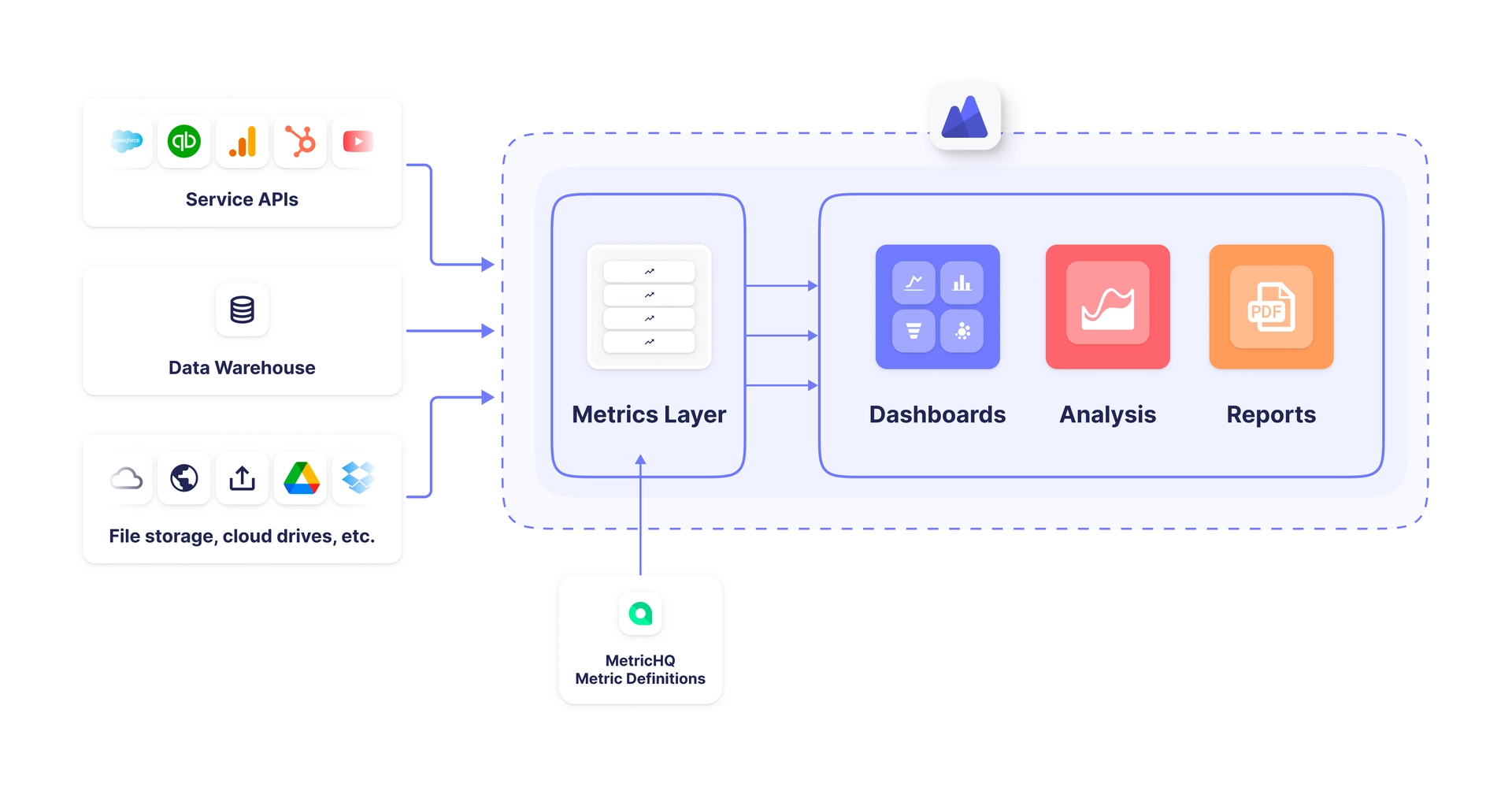
PowerMetrics is an AI analytics platform that helps you centralise metrics and build dashboards your whole organisation can trust. You connect spreadsheets, cloud apps, databases, data warehouses, and semantic layers. The result is a governed metric catalog that promotes shared definitions everyone trusts and can use to make decisions faster and with more confidence.
Beyond features, proof lives in customer stories. Below you'll find unedited quotes from users and partners, grouped into themes that mirror how buyers evaluate tools: flexibility, real-time visibility, actionable insights, ease of use, value, support, customisation, and the technical trade-offs to expect.
What real users say about PowerMetrics
Flexibility and data connections
PowerMetrics integrates with spreadsheets, flat files, APIs, databases, warehouses, and semantic layers like dbt and Cube. Users highlight the freedom to bring many sources together and still model, clean, and calculate metrics.
Ivan Zaykov, Finance Analyst, Planday: "We picked PowerMetrics because the solution is very flexible. It enables us to work with many different data sources, while still being able to model and clean the data. Also, I think that the combination of price and functionality is excellent."
Alejandro, CEO in Colombia: "Great way to keep track of KPIs and financials at company and department levels. Fully customisable data visualisations and the ability to get data from tons of sources. Overall, very happy with the solution. We are able to share key dashboards with each department lead and keep improving them over time as needs change."
Richard Marginson, General Manager, Media Propulsion Laboratory: "PowerMetrics, by providing self-serve data access to our clients, solved one of the biggest challenges we previously faced with data reporting."
Real-time visibility
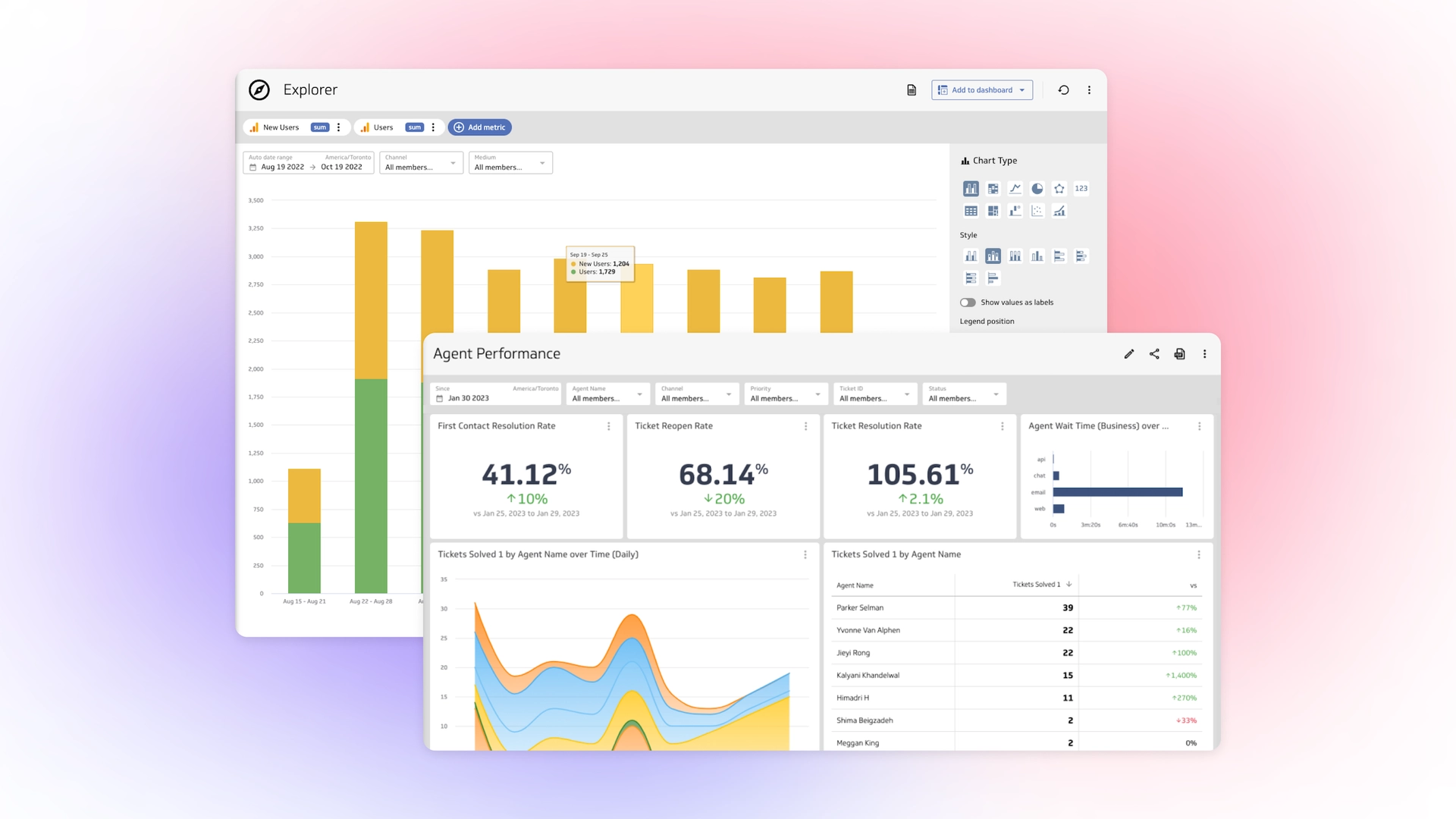
Teams want one place to see trusted, current numbers. PowerMetrics stores history and refreshes on a schedule that fits your needs, so leaders can check health in the moment and stay aligned.
Ivan Zaykov, Finance Analyst, Planday: "All of my colleagues appreciate being kept in the loop and I sometimes see managers pull their own PowerMetrics reports up on the TV screens to discuss individual team KPIs."
Alejandro, CEO in Colombia: "Great experience overall. It definitely solved our needs to track the KPIs and financials across the company and department levels. We keep improving the dashboards and utilise new data as new needs arise."
Actionable insights and trusted metrics
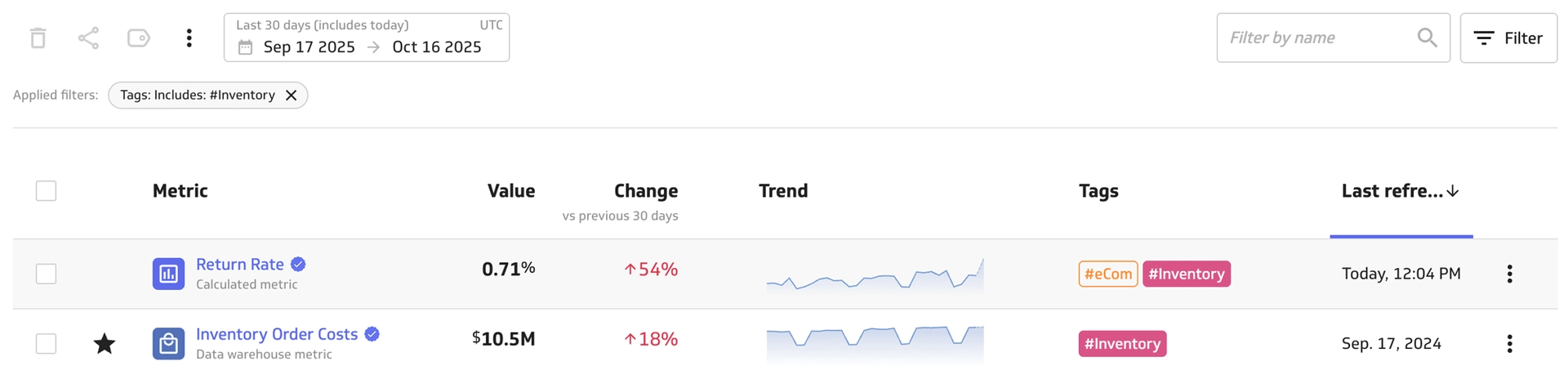
When metrics are defined, understood, and shared, people can move from arguing about numbers to acting on them. Reviewers point to clarity, quick filtering, and faster decision-making.
Vinicius Simioni, Agente Imóvel: "PowerMetrics is a great way to track KPIs. I really like that you have the ability to filter and segment the data with a couple of clicks."
Therese Moriarty, Founder and Principal, Eyeful: "With PowerMetrics, our clients can quickly create charts and answer key business questions with minimal training."
Therese Moriarty, Founder and Principal, Eyeful: "This ease of use eliminates bottlenecks typically caused by overextended data teams and empowers business users to analyse data and generate insights independently."
Ease of use and learning curve
Buyers weighing traditional business intelligence tools against a metric-centric approach often care about how fast non-technical teammates can contribute.
Brice Sloan, Sloan SG: "I like the simplicity and elegance of PowerMetrics. This is a great feature for non-technical people who wouldn't have a dashboard otherwise."
Therese Moriarty, Founder and Principal, Eyeful: "PowerMetrics provides many of the sophisticated features included in enterprise BI products, without the steep learning curve."
Randi F., Owner & Business Strategist, Management Consulting (Software Advice Review): "PowerMetrics is an easy to learn platform that provides lots of functionality and customisation. There is a good selection of visualisation options and ability to do metric calculations in the platform."
Value and ROI
Cost matters, especially for small and mid-sized teams. Reviewers call out flexibility plus pricing as a smart combination.
Andrew W., Data Scientist: "Klipfolio PowerMetrics is the best BI tool for creating custom reports!"
Ivan Zaykov, Finance Analyst, Planday: "We picked PowerMetrics because the solution is very flexible… the combination of price and functionality is excellent."
Therese Moriarty, Founder and Principal, Eyeful: "PowerMetrics speeds up our time-to-value, enabling us to work more cost-effectively."
Support and partnership
Adoption improves when product guidance and support keep teams moving.
Randi F., Owner & Business Strategist, Management Consulting (Software Advice Review): "So far I am very pleased with my experience. And have gotten some wonderful support from the Klipfolio team."
Layne Booth, Owner and CEO, The Project Booth: "For us, PowerMetrics stands out for three main reasons: top integrations list, ease of use and best-in-class customer service."
Richard Marginson, General Manager, Media Propulsion Laboratory: "We couldn't be happier with our Klipfolio partnership or with the results we've seen so far."
Customisation and dashboards that rally teams
Dashboards do more than display numbers. They create shared focus and momentum.
Ivan Zaykov, Finance Analyst, Planday: "Do it! PowerMetrics has benefits that go above and beyond just the analytics on their own - it has become a rallying point throughout our company's success."
Layne Booth, Owner and CEO, The Project Booth: "PowerMetrics hasn't just changed our business; it's become the cornerstone of what we do at The Project Booth."
Randi F., Owner & Business Strategist, Management Consulting (Software Advice Review): "So far I am very pleased with my experience… I look forward to continuing to learn more about the platform and expanding my dashboard builds."
Technical trade-offs to expect
Every analytics stack has trade-offs. These quotes help set expectations about sophistication without excessive complexity.
Therese Moriarty, Founder and Principal, Eyeful: "It's a refreshing alternative to other enterprise BI products that often require a deep understanding of databases."
Richard Marginson, General Manager, Media Propulsion Laboratory: "The ability to directly query data in the warehouse and visualise it in PowerMetrics was a night and day change for us."
Therese Moriarty, Founder and Principal, Eyeful: "The data modeller is one of our favourite PowerMetrics features."
Pros and cons of PowerMetrics: What customers think


Pros users mention most
- Flexible connections: Bring spreadsheets, apps, APIs, databases, warehouses, and semantic layers together.
- Trusted metric catalog: Define metrics once, share everywhere, and reduce confusion across teams.
- Fast time to value: Templates, stored history, and an approachable modeller shorten the path to insight.
- Ease for non-technical users: Short learning curve and clear visualisations help more people participate.
- Strong support: Reviewers consistently call out responsive, helpful guidance.
- Value for money: Pricing balanced with capability suits small and mid-sized teams.
Cons and trade-offs to plan for
- Initial modelling work: You'll get the best results when metrics are well defined. Plan a short setup period to name, describe, and certify key metrics.
- Governance choices: Self-serve is powerful. Put roles, groups, and approvals in place early so access stays clean and organised.
- Advanced scenarios need know-how: Complex joins or custom calculations may require a data-savvy owner. Most teams handle this with a light data steward model.
Is PowerMetrics worth it? Customer feedback helps you decide
If you want a governed metric layer that connects to almost anything, supports both business users and data teams, and keeps everyone looking at the same numbers, reviews suggest PowerMetrics fits the brief. You gain faster decisions, fewer debates about definitions, and dashboards that keep teams aligned.
These user quotes capture the impact in plain language:
Therese Moriarty, Eyeful: "PowerMetrics provides many of the sophisticated features included in enterprise BI products, without the steep learning curve."
Pablo Srugo, Mistral Venture Partners: "You don't need to measure 30 things; you want to keep it simple and measure the most important things in 2 key areas: generic metrics and company specific metrics."
Capterra: "Great product backed by an amazing team that cares about innovation and customer support."
Top 5 things people love about PowerMetrics
- Connects to almost anything: 130+ connectors, REST support, and direct-to-warehouse options make integration simple.
- Trusted, governed metrics: Clear definitions, certification, tagging, and access control reduce confusion.
- Fast time to dashboards: Templates, an Excel-like formula system, and stored history speed setup.
- Approachable for business users: Reviewers highlight quick learning and easy filtering.
- Support that sticks with you: Customer service and partnership are common themes in reviews.
3 common challenges mentioned by users
- Defining metrics up front: Expect to spend time agreeing on names, formulas, and owners. That effort pays back with fewer reporting debates later.
- Balancing self-serve with control: Put roles and certifications in place so new metrics don't fragment your catalog.
- Complex data prep cases: When modelling spans many sources or advanced calculations, assign a data steward who can coach others.
Who PowerMetrics is best for
- Small and mid-sized teams that need governed self-serve analytics without enterprise overhead.
- Leaders who want alignment across finance, marketing, sales, success, and operations.
- Data teams that want a metric layer business users can trust, while keeping control of definitions and access.
Quick answers to top buyer questions
Is PowerMetrics good?
Based on user reviews across roles and industries, yes. PowerMetrics balances flexibility and governance, and it's accessible to non-technical teammates. Customers consistently praise its ability to centralise metrics, reduce reporting bottlenecks, and empower business users to answer their own questions.
What are the pros and cons?
Pros: Flexible data connections, trusted metric definitions, fast time to value, ease of use for non-technical users, strong customer support, and solid pricing for growing companies.
Cons: Initial setup requires time to define and certify metrics, governance needs planning to keep access and definitions clean, and advanced data scenarios benefit from a dedicated data steward.
Is PowerMetrics worth it?
If your goal is a shared, trusted view of business health with self-serve access, reviewers suggest PowerMetrics is worth the short setup time to gain long-term clarity. The investment pays back quickly through faster decisions, fewer arguments about data definitions, and stronger alignment across teams.
Ready to try it?
Try PowerMetrics and build a trusted catalog of metrics your whole organisation can use for reporting and analysis. Start with a few critical metrics, share a dashboard, and add users and teams as you go. Most teams see value within weeks.