
What is a Data Catalog?
 David MenniePublished 2025-11-19
Summary: A data catalog is a centralised repository that helps businesses organise, govern, and discover their data assets. This guide explores its importance, key components, types, implementation strategies, and how it supports modern analytics and decision-making.
Companies cannot achieve sustainable growth without leveraging data for informed decision-making. Data analysts and business leaders rely on data science—which uses algorithms and systems to extract actionable insights from datasets—to stay competitive. A data catalog is a crucial tool that enables this process.
A data catalog helps professionals organise, find, and manage their data effectively. This guide explores its importance, key components, implementation strategies, and how it supports modern analytics workflows.
What is a data catalog?
A data catalog is a centralised repository that helps businesses manage and govern large amounts of data. Even "small-scale" catalogs can handle metadata for hundreds to thousands of datasets for startups, while enterprises can scale to billions of metadata records and data assets.
As a comprehensive directory of accessible data, a catalog provides information to assess whether data is fit for its intended use. It tells you what the data is about, where it comes from, how it's evolved, and who owns it. This helps analysts and business users understand data origin and history while enabling them to manage information and comply with regulatory requirements.
Modern catalogs also encourage collaboration by offering a platform where stakeholders can:
- Share findings and insights
- Comment on data quality
- Recommend improvements or changes
This shared understanding promotes consistent data interpretation across the organisation and enhances how teams use data for decision-making.
What is metadata?
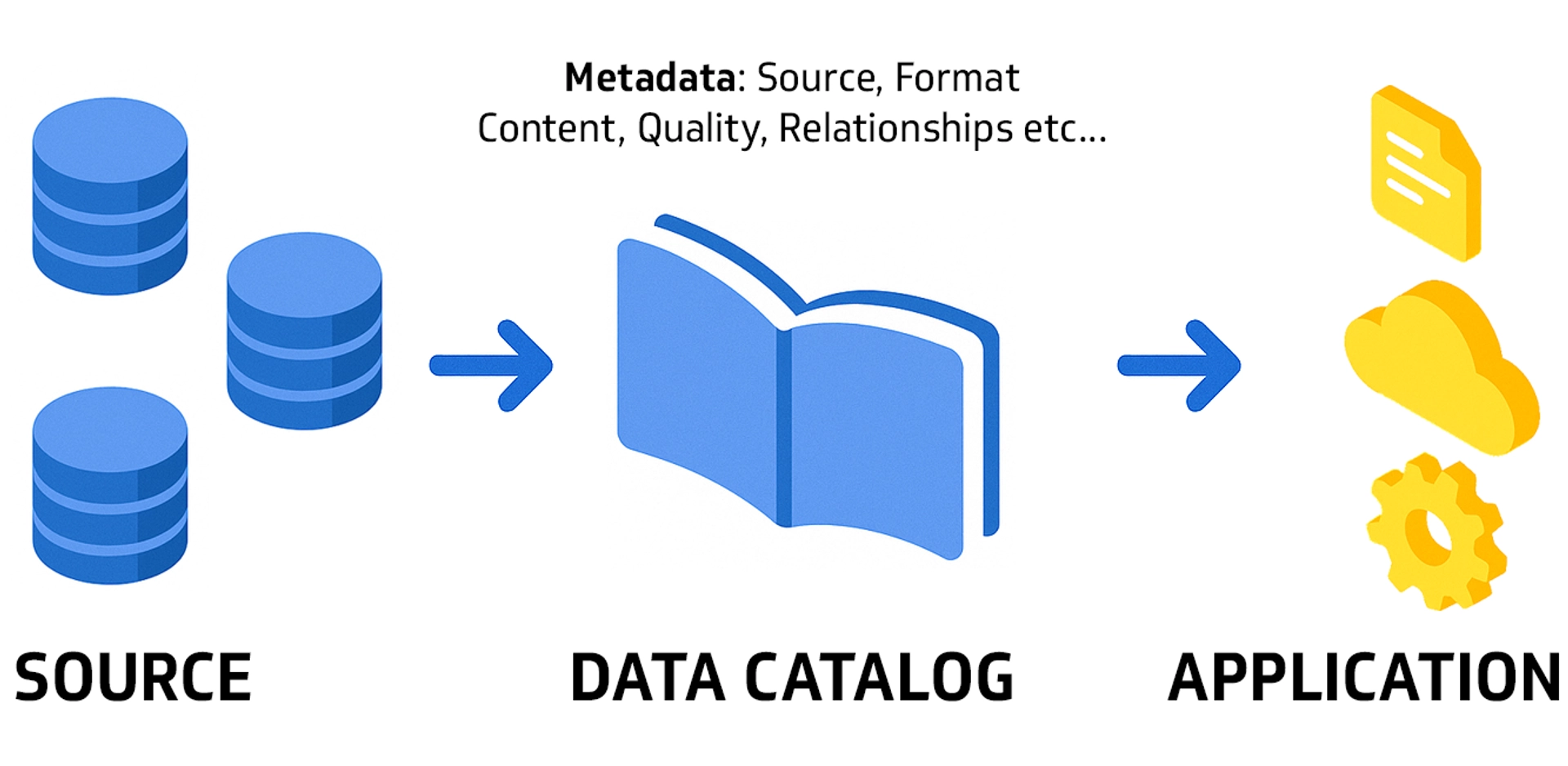
Metadata is data about data. It provides descriptive, structural, and administrative information about your organisation's data assets.
Metadata includes details such as:
- Data origin and source system
- Format and structure
- Content and description
- Quality metrics and assessments
- Relationships to other assets
In a data catalog, metadata acts as the foundational layer. It offers insights into your data assets' characteristics, usage, and lineage, allowing you to understand and use your data more effectively. Modern systems automatically profile data, apply rules, identify issues, and measure data quality via metrics and scorecards.
Why is cataloging data important?
Data plays a central role in today's business landscape. Data catalogs help businesses develop new ideas, stay competitive, and make faster, more confident decisions. Here are six reasons cataloging data is indispensable:
1. Enhances data discoverability and accessibility
Cataloging boosts your data's discoverability. This reduces the time analysts spend searching for data assets, allowing them to swiftly and accurately locate and access relevant information. Instead of hunting through multiple systems or asking colleagues, users find what they need in one place.
2. Facilitates data governance and compliance
Maintaining metadata and lineage helps ensure data's origin and changes align with legal rules and standards. This aids businesses in staying compliant with data regulations like GDPR, HIPAA, and SOC 2, ensuring data privacy and security.
A well-maintained data governance framework, supported by metadata and lineage, provides clarity and transparency to your data processes. This is essential for regulated industries and organisations handling sensitive customer information.
3. Empowers users and promotes informed decision-making
Cataloging data provides clarity and context regarding all available data assets. This system encourages innovation and the development of new data models and strategies, offering insights into your data's potential applications and limitations. Business users can confidently build reports and analyses knowing their data is trustworthy and well-documented.
4. Mitigates risks associated with data silos
Data silos occur when information is kept separate by departments or teams within an organisation. This can lead to inefficiencies, miscommunication, and missed opportunities.
Silos create fragmented information and reduced visibility into your data assets. A data catalog addresses these challenges by offering a unified and comprehensive view of all your assets across various departments, enabling the business to leverage their value fully.
5. Fosters collaboration and knowledge sharing
A data catalog brings teams together and aligns them around data. It creates a space for sharing knowledge, where people can add notes and share insights about data assets through enhanced metadata, certifications, ratings, reviews, Q&A, and notifications.
For instance, when sales and marketing departments access a unified data view, they can collaborate more effectively on campaigns and customer outreach. This shared understanding ensures smoother inter-departmental operations and synergy.
6. Streamlines data management and optimises data use
Data cataloging puts all data in one place so it's easy to find and fast to access. A seamless user experience with built-in access protection for sensitive data helps facilitate the search and evaluation process. Users spend less time hunting for data and more time analysing it.
Parts of a data catalog
A comprehensive data catalog is made up of several integral components, with each part contributing to the effective management and use of data. Below is a list of all the parts of a typical modern catalog.
Metadata repository
The metadata repository is the core of your data catalog. It helps you find and understand your data, enabling stakeholders to make informed decisions using the data you have.
The repository stores detailed metadata about each data asset, including:
- Source and origin system
- Structure and schema
- Relationships to other assets
- Usage patterns and frequency
For example, metadata about a customer database might include when the assets were last updated, who owns the data, where it's stored, and a description of what each field represents.
AI-powered automation
Modern catalogs leverage artificial intelligence and machine learning to automate data discovery, profiling, quality assessment, and governance tagging. AI-driven algorithms automatically scan, ingest, and classify data from various sources, including multi-cloud platforms, BI tools, and third-party metadata catalogs. This capability intelligently automates data discovery, search, recommendations, profiling, quality assessment, and governance tagging—reducing manual effort and improving accuracy.
Search and discovery tools
Powerful search capabilities and filters make finding data in the catalog straightforward. You can search by criteria such as data type, source, ownership, or associated keywords. Advanced search and discovery tools save time and ensure people find exactly what they're looking for, even across complex data ecosystems.
Data profiling
Data profiling provides insight into the quality and structure of your data, helping users determine if the information is suitable for certain types of analysis. When combined with metadata, data profiling gives a fuller understanding of your data, which helps you use and manage it more effectively. This includes identifying missing values, outliers, and data type mismatches.
Data lineage
Data lineage refers to the life cycle of data, from its origin to how it's transformed over time. Modern systems provide end-to-end data lineage that offers a comprehensive view of how data moves through systems. Its main functions include:
- Tracing errors back to the source
- Showing how data influences reports and analysis
- Supporting compliance by documenting data flow
For example, a retail store checking its monthly sales can use data lineage to determine if a sudden increase in product sales was caused by a special promotion or marketing campaign. This insight helps the store understand what worked well and what to improve next time.
Security and access controls
Regular security checks keep your data safe and ready to use. Access control rules let you share data while following company guidelines and legal requirements. Security measures like passwords, encryption, and multi-factor authentication ensure only authorised people can access sensitive data. This prevents unauthorised access and data breaches.
User interface
A well-designed interface is critical for adoption. A user-friendly interface often supports features like search bars, filters, and category options to make finding and managing data easier. When data is organised intuitively, users spend less time navigating and more time extracting value from the catalog.
Collaboration and social features
Collaboration is key in any team or business. When people work together, they develop better ideas, solve problems faster, and learn from each other. Sharing thoughts and feedback on data can lead to new discoveries and better decisions.
Features like discussion forums, comment sections, and annotation tools make it easy for people to discuss, annotate, and share insights on data. They make the catalog more interactive, encouraging everyone involved to participate actively and contribute their expertise.
Types of data catalogs
There are five common types of data catalogs:
- Open-source data catalogs
- AI-powered open-source data catalogs
- Commercial data catalogs
- Cloud-based data catalogs
- On-premises data catalogs
Knowing the different types can help you find the best one that suits your organisation's needs, budget, and technical capabilities. Let's take a closer look at their pros, cons, and typical pricing.
Open-source data catalogs
Pros
- No initial cost
- Highly customisable, as you can modify the code
- Full transparency into how the system works
Cons
- Requires technical expertise to set up and manage
- May not offer as comprehensive support as commercial options
- Ongoing maintenance responsibility falls on your team
Open-source solutions such as Apache Atlas and Amundsen are free and available online with relatively quick setup. These can be a good starting point for organisations with strong technical teams looking for a cost-effective solution.
The main requirement is that you need in-house technical expertise to create and maintain the customised catalog you need.
AI-powered open-source data catalogs
Pros
- Combines open-source flexibility with intelligent automation
- Cost-effective with advanced features
- Reduces manual data profiling and classification
Cons
- Still requires technical expertise to implement and maintain
- May have limited AI feature sets compared to commercial solutions
- Support community may be smaller than commercial vendors
This emerging category bridges traditional open-source and commercial solutions by incorporating machine learning capabilities for automated data discovery and classification while maintaining the flexibility of open-source platforms. These solutions are ideal for organisations with technical resources who want to avoid commercial licensing costs.


Commercial data catalogs
Pros
- Comprehensive features and tools out of the box
- Dedicated customer support and professional services
- Advanced AI and automation capabilities
- Regular updates and new feature releases
Cons
- Can be expensive, especially for large-scale deployments
- May include features that your organisation does not need
- Vendor lock-in concerns
Commercial solutions such as Alation, Collibra, and Atlan are paid options often with additional features and dedicated customer support. This type is best for larger organisations requiring advanced features, rapid implementation, and ongoing vendor support.
Commercial catalogs typically range from $10,000 to $100,000+ annually, depending on features, user count, and deployment scale.
Cloud-based data catalogs
Pros
- Easy access from anywhere with an internet connection
- Often updated and maintained by the service provider
- Flexible pricing models and lower upfront costs
- Automatic scaling to handle growing data volumes
Cons
- Ongoing subscription fees
- Dependence on internet connectivity
- Data residency and compliance considerations with cloud providers
Cloud-based solutions are hosted on the internet, providing accessibility from anywhere at any time. These are suitable for organisations looking for easy setup, minimal maintenance, and remote accessibility. Pricing varies significantly based on enterprise needs, data volume, and feature requirements—typically ranging from a few thousand to tens of thousands annually.
On-premises data catalogs
Pros
- Full control over the data catalog and its security
- Not dependent on internet connectivity
- Data stays within your organisation's infrastructure
- May meet strict data residency requirements
Cons
- Requires in-house server hardware and ongoing maintenance
- Initial setup can be more complex and costly
- Responsibility for all updates and security patches
On-premises solutions are installed and run on your organisation's own servers. They're a good fit for organisations that prioritise control, have strict data residency requirements, or possess the necessary infrastructure in place. Initial deployment costs can range from $10,000 to $100,000+ depending on scale and features, with additional ongoing costs for maintenance, updates, and infrastructure.
To get started, assess your current IT setup, consult a data management expert, and choose a solution that aligns with your organisation's needs and long-term data strategy.
Challenges in cataloging data
Data catalogs are instrumental in enhancing data management and analytics. However, businesses still face several challenges in implementing and maintaining them effectively.
Below are the key issues you might encounter when cataloging your data:
Data quality
Issues with data quality can hinder the cataloging process and the system's usefulness. This can include inconsistent or incomplete data, outdated information, or inaccuracies. To avoid these problems, establish quality standards and procedures to monitor and improve your data assets. Implement automated data validation rules and regular quality audits to maintain trust in your catalog.
Data security and compliance
Businesses must be proactive in implementing appropriate security measures within their catalog. This includes encryption, multi-factor authentication, and granular access limitations. Consistent audits and compliance checks should be carried out to facilitate the ongoing security of the system. Ensure your catalog meets industry standards and regulatory requirements specific to your business.
Integration with diverse data sources
Another challenge is combining data from different sources and formats into one catalog. Data might come from sources like CRM systems, databases, spreadsheets, cloud storage platforms, APIs, and streaming data sources. This data can also be in various formats, such as CSV, JSON, XML, or Parquet.
This task requires advanced integration capabilities. To handle various kinds of data effectively, invest in scalable and flexible solutions. These might include high-level integration tools and platforms that offer multiple data ingestion methods, transformations, and mappings. As data continues evolving, businesses need to seamlessly combine and manage different data types to make informed decisions.
User adoption and training
There's always a learning curve when introducing new systems, even for tech-savvy users. Some team members may find the interface and functionalities difficult to learn or use, leading to low adoption rates. Scheduling regular training and support can help overcome these challenges.
Offering continuous support—such as 24/7 helpdesk availability, periodic refresher courses, online tutorials, FAQ sections, and dedicated chatbots for instant queries—can help address any issues or concerns that may arise. Strong user adoption is critical to realising the full value of your catalog investment.
Scalability and performance
As the amount and types of data you handle keep growing, your catalog must also scale to meet your organisation's changing needs. Slow or inefficient systems can frustrate users and hinder accessibility.
Monitor your catalog's performance regularly, then make the necessary upgrades or modifications for your systems to keep pace. Solutions such as cloud-based platforms, advanced caching, and in-memory processing can boost performance and handle growing data volumes effectively.
Metadata management
Good metadata management helps maintain a functional and useful catalog. However, doing this manually takes significant time and can lead to errors. As much as possible, automate metadata management to keep the catalog accurate and reliable.
Use tools that automatically check, validate, and update data details as they change. These tools can spot changes, update the data information, and maintain consistency. This means less manual work and a more trustworthy catalog that your team can rely on.
Implementation strategies for data catalogs
Establishing implementation strategies helps keep data organised, easy to find, and useful for everyone. Using the right methods can make your catalog helpful for decision-making and business growth. Here are key strategies to consider when cataloging your data:
Align with organisational goals
Before you begin, decide what you want to accomplish with your system. Two main reasons to choose a catalog are to make data easier to find and to ensure it follows regulations. By matching your organisation's goals with the catalog, you ensure it will be valuable and meet your business needs. This alignment ensures stakeholder buy-in and a higher return on investment.
Involve all key stakeholders
Involving the right people—such as data users, IT professionals, business leaders, and compliance officers—makes the cataloging process smoother and more successful. Their insights and expertise contribute to more informed planning and decision-making.
Their knowledge helps create more effective user adoption strategies and identify training needs, allowing all team members to use the catalog efficiently. Early stakeholder involvement also reduces resistance to change and builds organisational support.
Leverage AI-powered automation
Implement AI-driven algorithms that automatically scan, ingest, and classify data from various sources, including multi-cloud platforms, BI tools, and third-party metadata catalogs. This automation reduces manual effort while improving accuracy and completeness of your catalog.
AI-powered features like automated data profiling, quality scoring, and intelligent tagging accelerate time-to-value and reduce the burden on your data teams.
Prioritise user-friendly design
Create a catalog that is easy to use so you can easily find the data you need and make the most of the available features. Ensure it's intuitive to navigate with clear functions and logical organisation. A well-designed interface encourages adoption and reduces training time.
Establish clear governance and security protocols
Put in place robust governance and security protocols to keep your data safe, high-quality, and compliant with regulations. Set up access controls, identity verification methods, and decide who's responsible for securing and managing sensitive data.
These rules shouldn't make it difficult for authorised users to access the data. Regularly carry out security and compliance checks to find and address potential risks immediately.
Provide adequate training and support
To boost user adoption, you must have comprehensive training and support. Provide resources like manuals, tutorials, help desks, and online learning modules to help users navigate and use the catalog more smoothly and effectively. Ongoing support is critical to maintaining engagement and extracting long-term value.
Consider phased implementation
Start with a small pilot project with limited data and users. This test helps check how efficient and useful the tool is without significant risk. As you move forward, you can gradually include more data and users, making changes and improvements based on feedback and user experience from the pilot project.
A phased approach reduces disruption, allows time for refinement, and builds confidence in the solution before full-scale rollout.
Ensure comprehensive ecosystem coverage
Enterprise customers should look for providers that automatically catalog the entire technology, data, and AI ecosystem. This comprehensive approach supports modern AI governance requirements and ensures all data assets are properly managed and discoverable across your organisation.
Monitor and continuously improve your catalog
After setting up your system, check performance regularly, including how users interact with it and their feedback. Use this information to keep making improvements and meet new needs. This way, your catalog will always be valuable to your organisation.
Establish key performance indicators (KPIs) such as search success rate, user adoption, and time-to-discovery to measure the catalog's effectiveness and identify areas for improvement.
A cornerstone for data-driven success
A well-implemented data catalog serves as a sturdy foundation that can help you optimise data usage and achieve your business objectives. If you want to foster a data-driven culture, promote transparency, and empower decision-makers, having this system helps you unlock valuable insights for your business and gain a competitive edge.
By centralising your data assets, automating governance, and enabling self-service analytics, you create an environment where every team member can confidently access and use data to drive better decisions. Start small, involve your stakeholders, and build your catalog incrementally to ensure long-term success and adoption.