
AI and data privacy: What every business should understand (and what PowerMetrics does about It)
 Kyle CampbellPublished 2026-06-17
Summary: AI is changing how businesses work with data. But for most small and mid-sized businesses, the first question isn't "what can AI do for me?" — it's "is my data safe?" That's the right question to ask. This guide walks through how AI and data privacy actually work, what the real risks are, and how PowerMetrics is built to give you the benefits of AI without compromising your data or your users' trust.
The core fear — and why it's legitimate
When businesses hesitate to adopt AI tools, the worry usually boils down to this: "If I put my company's data into an AI, will it end up somewhere it shouldn't?"
That's not paranoia. It's a reasonable concern, because the answer depends entirely on which AI tool you're using and how it's configured.
An important distinction: Free vs. commercial accounts
The biggest source of confusion is assuming all access to an AI provider works the same way. It doesn't.
Most major AI providers — OpenAI, Anthropic, Google — draw a sharp legal line between free consumer plans and paid commercial plans.
Free consumer tools (ChatGPT free tier, Claude.ai free) typically retain your conversations and, depending on your settings, may use them to improve their models. If your team is pasting customer data, financial reports, or internal strategy documents into these tools, you may be feeding that data into a public training pipeline.
Paid commercial and API plans operate under a fundamentally different contract. Your data is by default legally walled off from public model training with most commercial agreements. Inputs and outputs are treated as confidential. You're covered under a Data Processing Agreement (DPA), which creates binding legal obligations about how your data is handled. Even so, it is important to understand your provider's handling of your data. Some providers are moving away from Zero Data Retention models in order to meet legal compliance needs.
The practical rule: if you're using AI for real business work, you need a business account. Full stop.
Four operational guardrails for any AI tool
Regardless of which AI platform your team uses, these practices reduce your exposure significantly.
1. Upgrade to a business tier before sharing anything sensitive. Free accounts are for exploration. Once real customer data, financial records, or proprietary strategy is involved, you need the legal protections that come with a commercial plan.
2. Anonymize before you share. The safest data is data you never send. Before uploading client logs, customer feedback, or internal reports, strip out personally identifiable information (PII) — names, email addresses, account numbers, physical addresses. Replace specifics with placeholders.
3. Apply role-based access controls. Not everyone on your team needs access to everything. Define who can use AI tools and what data those tools can reach. Just because an employee has access to HR files doesn't mean an AI assistant should.
4. Be careful with feedback and error reports. Even on enterprise plans, feedback submissions (like flagging a bad AI response) may be handled under a looser privacy wrapper for human review. Train your team not to paste sensitive context into those fields.
What this means for analytics specifically
The stakes are even higher when AI is working directly inside your analytics platform — where it has access to your actual business metrics, revenue data, user behaviour, and operational numbers.
In that context, "is my data safe?" breaks into three distinct questions:
- Does the AI respect who can see what? Access controls exist for a reason. An AI assistant that can answer any question from any user bypasses every permission you've set up.
- Can the AI change or delete my data? An AI with write access to your metrics or dashboards is a risk surface — whether through error or misuse.
- Does data leave the platform? If your metrics are being sent to an external AI service to generate answers, you've lost control of where that data goes.
How PowerMetrics handles this
PowerMetrics was built with these questions in mind. Here's how the AI Assistant works — and what it doesn't do.


It respects your access controls
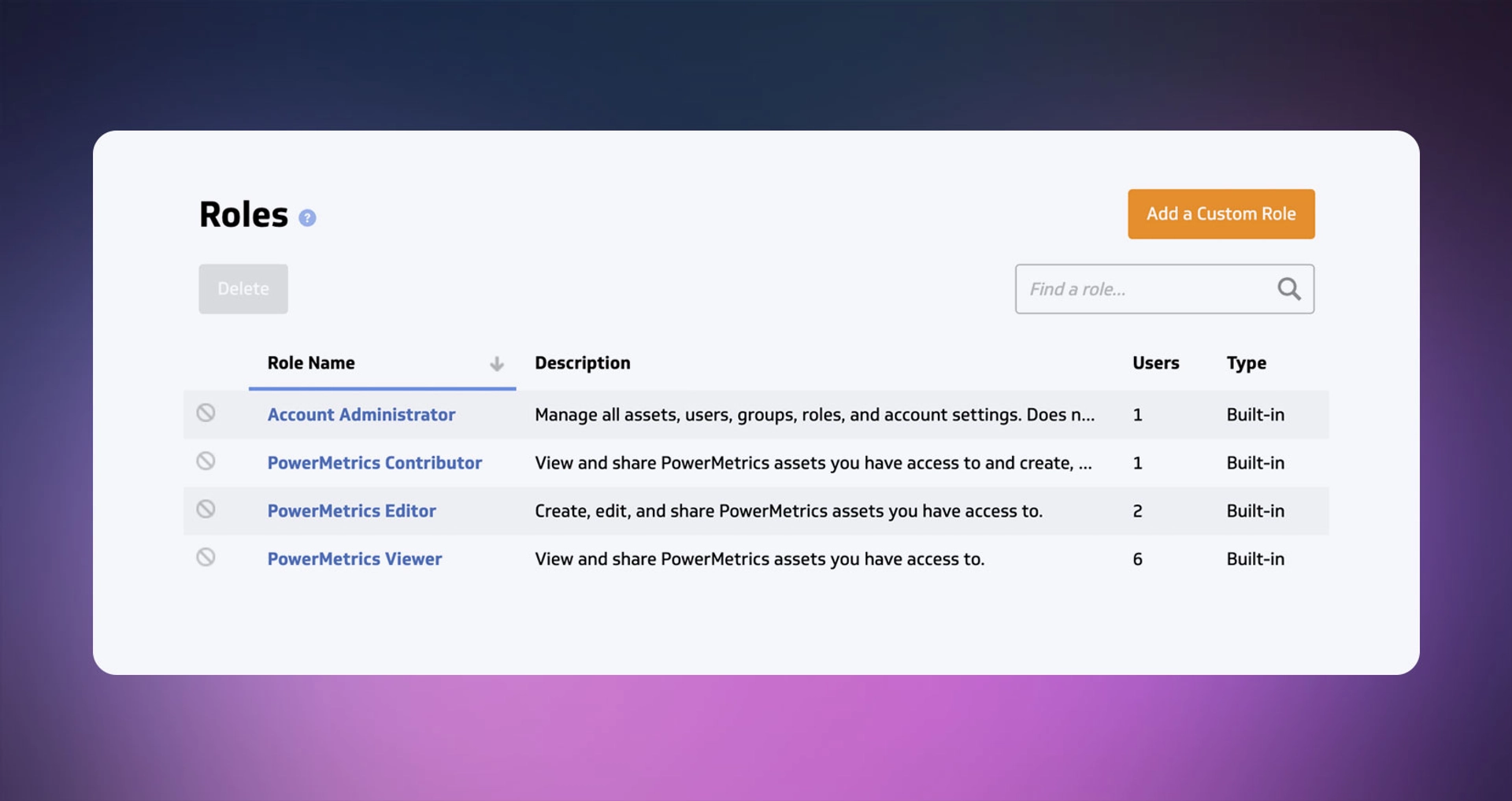
The AI Assistant doesn't get a master key. It operates within the same permission structure that governs every user in your account. If a Viewer-role user asks the AI a question, the AI only surfaces data that user is allowed to see. Editors and admins see more — because that's what their roles allow.
That's not a small detail. It means your access controls actually mean something, even with AI in the loop.
Your data stays inside PowerMetrics
Your raw metric data remains entirely within the PowerMetrics platform. We do not send your underlying data to external models for processing. Our AI Assistant performs all analysis within our secure environment, ensuring your sensitive data is never exposed to external training or storage. The LLM's role is limited to formulating the final, readable response based on the processed results, keeping your raw data securely inside our closed loop.
The AI is read-only
The AI Assistant can answer questions, surface insights, and help you navigate your data. It cannot edit, delete, or overwrite your metrics or dashboards. This isn't a soft guideline — it's a hard constraint built into the system.
Answers are grounded in your data, not the internet
When you ask the AI a question, it looks for answers in your PowerMetrics account — specifically, in the knowledge graph that maps the relationships between your data feeds, metrics, and dashboards. It doesn't hallucinate data from elsewhere or blend in information from outside your account.
That means answers like "Compare this month's MRR to the same month last year" or "What metrics roll up into this calculated metric?" are answered from your data, not approximated from somewhere else.
Admins control who can access the AI
Account administrators decide which users have access to the AI Assistant at all — options range from all users, to editors and above, to admins only, or disabled entirely. Admins can also set a system prompt to tailor the AI's behaviour to the company's tone and needs.

Roles and permissions in PowerMetrics
Understanding PowerMetrics' role structure matters because it's the foundation of everything above. The AI doesn't override it — it works within it.
| Role | What they can do |
|---|---|
| Account Administrator | Manage users, assign roles, view and delete account assets. Cannot see metric data unless it's been shared with them. |
| PowerMetrics Editor | Full access except account administration. Create, edit, share, and delete data feeds, metrics, and dashboards. |
| PowerMetrics Contributor | View and share metrics; create, edit, share, and delete dashboards. |
| PowerMetrics Viewer | View and share assets that have been shared with them. |
New users are assigned the Viewer role by default — the most restricted access level. Permissions escalate only when explicitly assigned.
One notable point: the Account Administrator role is a management role, not a data-access role. An admin can see that a metric exists and delete it, but cannot see the data inside it unless it's been explicitly shared with them. That's an intentional design decision that separates administrative control from data visibility.
The bottom line
AI tools are genuinely useful for analytics work. But the value only holds if you can trust the data — and trust that your data is protected.
The questions to ask of any AI-enhanced analytics tool are:
- Does it respect my access controls, or does it bypass them?
- Does my data stay inside the platform, or does it get sent somewhere else?
- Can the AI modify my data, or is it read-only?
- Can administrators control who uses it?
PowerMetrics answers all four the way a business should expect: access controls are respected, data stays inside the platform, the AI is read-only, and administrators are in charge.
That's not a feature list. It's a design philosophy — and it's the right foundation for using AI in business analytics.
Have questions about how PowerMetrics handles your data? Contact us or explore the PowerMetrics Knowledge Base.