
What are business metrics? Key terms and concepts
Summary: In Article 1, we talked about how to choose the right metrics — ones that are actionable, aligned with your goals, and built around ratios rather than raw numbers. To make those smart metric choices, it helps to learn the language.
Every profession has its own vocabulary. Carpenters talk about joints and grain. Chefs talk about mise en place and reduction. Data analysts talk about metrics, measures, and dimensions.
This article is your field guide to these core data analyst terms. Learn these, and you'll not only understand your metric data — you'll build it better from the start.
⬇️ Download the one-page cheat-sheet (PDF)
The importance of well-defined metrics
A metric is more than just a number on a dashboard. Every metric has a name, a clear definition, and a precise set of rules for how it's calculated.
Well-defined metrics are understood by everyone, company-wide. No matter what teams they’re on, two people can look at the same number and have it mean the same thing. The trouble begins when a metric is defined poorly, or not defined at all. This lack of clarity often results in two people looking at the same number, but interpreting it differently.
🛒 The grocery store example
The metric "Fruit Sales" is vague. Does it mean units sold or revenue? Does it include discounted items? Does it count items sold in-store, online, or both? Without a clear definition that answers these questions, the number is unreliable — two managers could look at the same "Fruit Sales" metric but take it to mean two different things. A well-defined metric eliminates that ambiguity.
A metric is made up of several components. Let's walk through each one.
Metrics, Measures, and Dimensions: The Language of Business Analytics
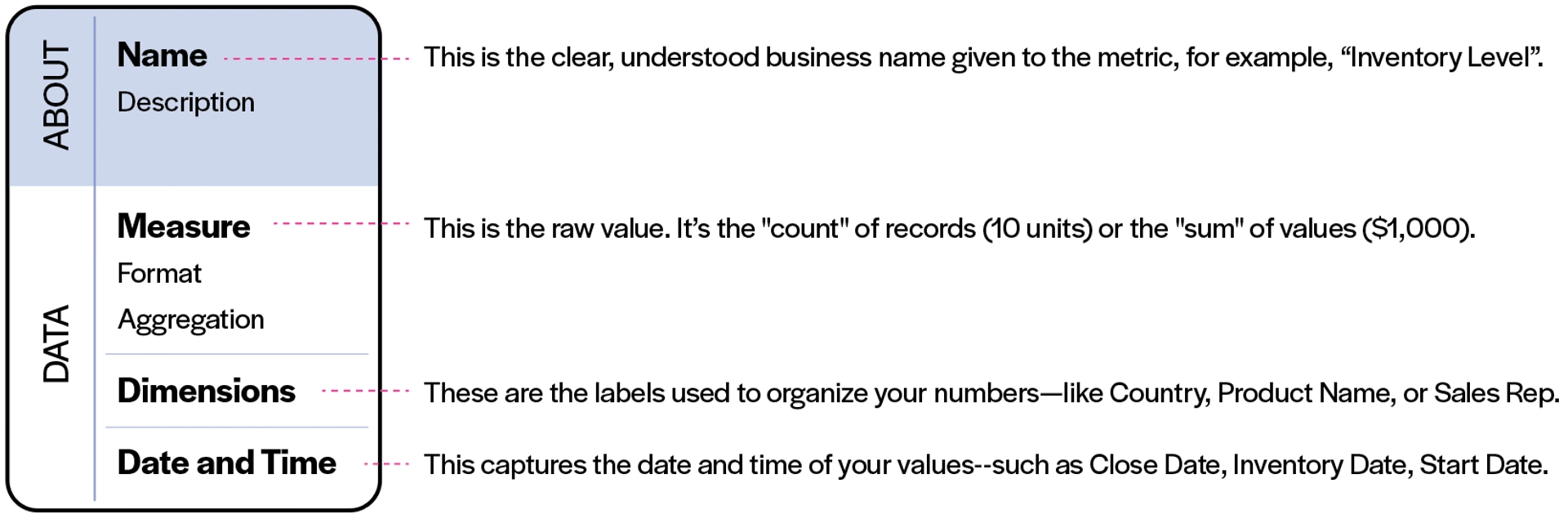
Name
The name is the clear, agreed-upon business term for what you're measuring. It should be immediately understood by everyone on your team — not just the person who created the metric.
Good metric names are specific and plain language. For example, "Inventory Level" is better than "Inv_Lvl_Curr", and "Revenue per Customer" is better than "Rev/Cust_Calc_v2".
A metric name is a promise. It tells everyone who reads it exactly what to expect — before they even look at the number.
Description
The description is where you add context. This might include:
- A plain-language definition of what's being measured
- Important nuances or exclusions (e.g., "excludes returns and cancellations")
- Where the data comes from
- How a calculated metric is derived (more on calculated metrics in article 3 of this series)
A good description makes the metric instantly understood. Anyone — including someone new to your team — should be able to read the name and description and fully understand what they're looking at.
🛒 Back to the grocery store
Name: Inventory Levels
Description: "The count of products in-stock and in storage across all locations."This description immediately answers several questions: it's a count (not revenue), it includes all locations, and it covers both in store and warehouse stock.
Measure
The measure is the raw value of the metric — the actual number being tracked. Every metric has one, and only one measure.
There are two fundamental types of measures:
- Count: Use this when you are counting items (e.g., 10 Apples).
- Sum: Use this when you are adding up values (e.g., $50.00 in sales).
Measures on their own are just numbers. What gives them meaning is everything around them: how they're formatted, how they're aggregated, and what dimensions slice through them.
Format
The format turns a raw number into something recognizable. Without a format, "100" could mean 100 dollars, 100 days, or 100%. The most common formats are:
Format | What it looks like | Example |
|---|---|---|
Numeric | A quantity | 1,240 units |
Currency | A monetary value | $42,500 |
Percentage | A ratio expressed as % | 84% sell-through |
Duration | A length of time | 3.5 days |
Applying the right format is more important than it sounds. A number displayed as a plain integer when it should be a percentage will be misread — and misread numbers lead to bad decisions.
Aggregation
Aggregation is the rule that tells your system how to combine individual data rows into the single number you see on a dashboard.
Imagine your grocery store logs a new row of data every time inventory is counted — hundreds of rows per day across all locations. Aggregation is what collapses all of that into one meaningful number.
Common aggregation types:
Aggregation | What it does | When to use it |
|---|---|---|
Count rows | Counts “how many” records | Number of transactions, number of customers |
Sum | Adds “numeric values” up | Total revenue, total units sold |
Average | Finds the mean | Average order value, average days to spoilage |
Max / Min | Finds the highest or lowest value | Peak inventory day, minimum stock level |
Cumulative count | Running count of units or records over time | Total Apples (units) sold this month |
Cumulative sum | Running total “numeric values” over time | Total of dollar value of Apples (currency) sold this month |
🛒 Meanwhile at the grocery store
For Inventory Levels, the aggregation is Sum — you want the total count of all units across every product, city, and storage location. If you used Average instead, you'd get the average inventory per row of data, which is a very different (and much less useful) number.
Choosing the wrong aggregation is one of the most common sources of errors in dashboards. It's worth pausing here to make sure the rule matches the question you're actually trying to answer.
Dimensions: The labels that bring metrics to life
If the measure is the what, dimensions are the where, who, and which.
Dimensions are the categorical labels attached to your data that let you slice, filter, and group your metrics in meaningful ways. They don't get summed or averaged — they organize. Think of them as the different lenses you can look through to understand a number.
Common examples: City, Product Name, Sales Rep, Store Type, Customer Segment.
🛒 The where, who, and what
Your Inventory Levels metric has three dimensions: Product, City, and Stock Location.
Without dimensions, you have one number: total inventory across everything. With dimensions, you can answer much more specific questions, such as:
- How much inventory does the Toronto store have? (filter by City = Toronto)
- Which fruit has the lowest stock right now? (filter by Product)
- Is the Vancouver warehouse running low? (filter by City = Vancouver + Stock Location = Warehouse)
This is why we said in Article 1 that "Total Fruit Sales" fails the "What's Next?" test — it has no dimensions. You can't break it down. You can't ask follow-up questions. Dimensions are what make a metric investigatable.
Dimension consistency: Why naming matters
Here's something that catches many teams off guard. Dimensions only work well when they're consistent across your metrics.
Suppose your sales team tracks a dimension called City, your inventory team tracks the same dimension but calls it Location, and your finance team calls it Store_Town. Now you have three metrics for the same city, but you can't combine or compare them — because the system doesn't know that City, Location, and Store_Town are the same thing.
This is the beginning of what's sometimes called data debt: a slow accumulation of inconsistencies that quietly undermine your ability to trust your data.
🛒 Consistency at our grocery store
If the "Fruit Sales" metric uses the dimension City and the "Inventory Levels" metric uses the dimension Location_City, you can't easily compare sales to inventory by city — even though the data exists. This inconsistency creates friction, extra work, and risk of error every time someone tries to connect the two.
Date and time: The mandatory dimension
Every metric needs to know when. Date and Time is a special dimension — it's not optional like the others. Without it, you can't trend a metric over time, compare this week to last week, or understand whether things are getting better or worse.
In practice, Date and Time refers to a specific timestamp field in your data, for example:
- Inv_DateStamp for an inventory metric (when was this count taken?)
- Close_Date for a sales metric (when did the deal close?)
- Order_Date for a revenue metric (when was the purchase made?)
Choosing the right date field matters. When an order was placed and when it was shipped are different events. Using the wrong one will make your trends misleading.
🛒 Time flies
For Inventory Levels, the date field is Inv_DateStamp — the timestamp of when each inventory count was recorded. This lets you ask questions like: What was our total banana stock on Tuesday morning? or How has Vancouver's orange inventory trended over the past two weeks?


Putting it all together
Here's what a fully-defined metric looks like, using the grocery store example:
Name | Inventory Levels |
|---|---|
Description | The total number of products in stock and in storage across all locations. |
Measure | Units |
Format | Numeric |
Aggregation | Sum |
Dimensions | Product, City, Stock Location |
Date and Time | Inv_DateStamp |
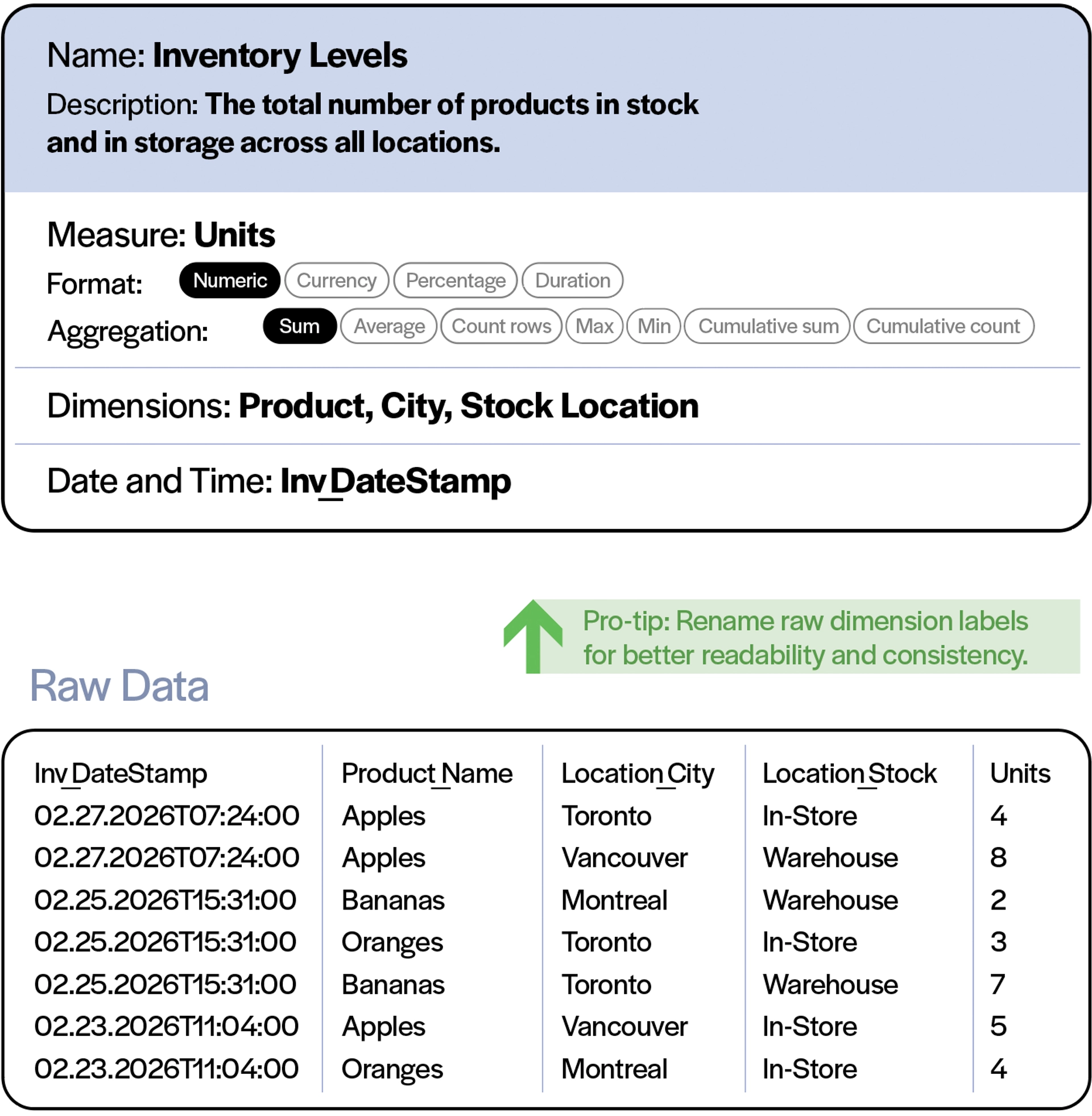
Every field plays a role. Take one away and the metric becomes less reliable, less useful, or harder to trust.
And this is the underlying point: a metric isn't just a column in a spreadsheet or a number on a chart. It's a structured, documented, agreed-upon definition of something your business cares about. When you treat it that way, your entire data culture improves.
A note on vocabulary: Measure vs metric
The terms "measure" and “metric” are often used interchangeably — but they mean very different things.
- A measure is the raw value, for example, units, dollars, count of orders.
- A metric is the full, defined construct, including the name, description, measure, format, aggregation, dimensions, and date field.
You can think of a measure as an ingredient, and a metric as the recipe. The same measure (say, Units) can appear in many different metrics — Units Sold, Units in Stock, Units Returned — each defined differently, with different aggregations, dimensions, and date fields.
Quick recap
- A metric is a formal, documented definition of something your business measures.
- The name should be clear and immediately understood by everyone on your team.
- The description adds context: what's included, what's excluded, where the data comes from.
- The measure is the raw value — a count or a sum.
- The format tells you what kind of number it is: numeric, currency, percentage, or duration.
- The aggregation is the rule for how rows of data are combined: sum, average, count, max/min, cumulative.
- Dimensions are the categorical labels that let you slice and filter — they're what make a metric investigatable. Consistent dimension naming across metrics helps prevent data debt.
- Date and Time is a mandatory dimension — every metric needs a timestamp to be useful over time.
What's next
Now that you know what a metric’s made of, you’re ready for the next step: Building a library of metrics that stays consistent and trustworthy as your business grows.
You’ll learn how in Article 3: Building Block Thinking, where we’ll describe how well-named, well-defined base metrics can be combined into calculated metrics. You’ll also learn why the decisions you make early (like what to call a dimension) have a compounding effect on everything you’ll build in the future.
Continue learning
- Metrics: The Building Blocks of Modern Self-Serve BI — a deep dive into how metrics are structured, stored, and shared across your organization.
- MetricHQ — an expert-contributed library of metrics and KPIs across every business function, so you're never starting from a blank slate.
PowerMetrics Concepts Series · Article 2 of 4