
Graph thinking: How relationships make your data smarter
Summary: Over the course of this series, you've built up a way of thinking about metrics that most teams never develop. But, there's one more layer to discover — and it might be the most important one.
You know how to choose metrics that lead to action. You know how to define them effectively — with the right measure, format, aggregation, and dimensions. And you know how to build them composably, so that base metrics combine into calculated metrics that stay consistent and accurate as your business grows.
This one isn’t about individual metrics. It's about the relationships between all of your metrics and everything that affects them.
From lists to maps
Consider the grocery store we have been using in this series.
You could describe everything in it as a list: a spreadsheet of every product, price, and stock count. And, while that list might be useful, it doesn't tell you how anything connects. It doesn't tell you that the Oranges on the shelf in Toronto came from a supplier in California, passed through a distribution warehouse in Hamilton, and were counted into inventory on Thursday morning. It doesn't tell you that if the Hamilton warehouse has a delay, the Toronto shelf runs low, which affects Sell-Through Rate, which affects the weekly reorder decision.
A map of your supply chain shows all of that. Not just what exists — but how everything relates.
When you apply graph thinking to your analytics, you transform your metric catalog from a list of numbers to a network of connected things — where understanding the relationships is just as important as understanding the metrics themselves.
Nodes and relationships
In graph thinking, there are two building blocks: nodes and relationships
Nodes are the things in your system. In PowerMetrics, your nodes include:
- Users
- Metrics (base and calculated)
- Dimensions (and their members)
- Data feeds
- Dashboards
- Goals
- Tags
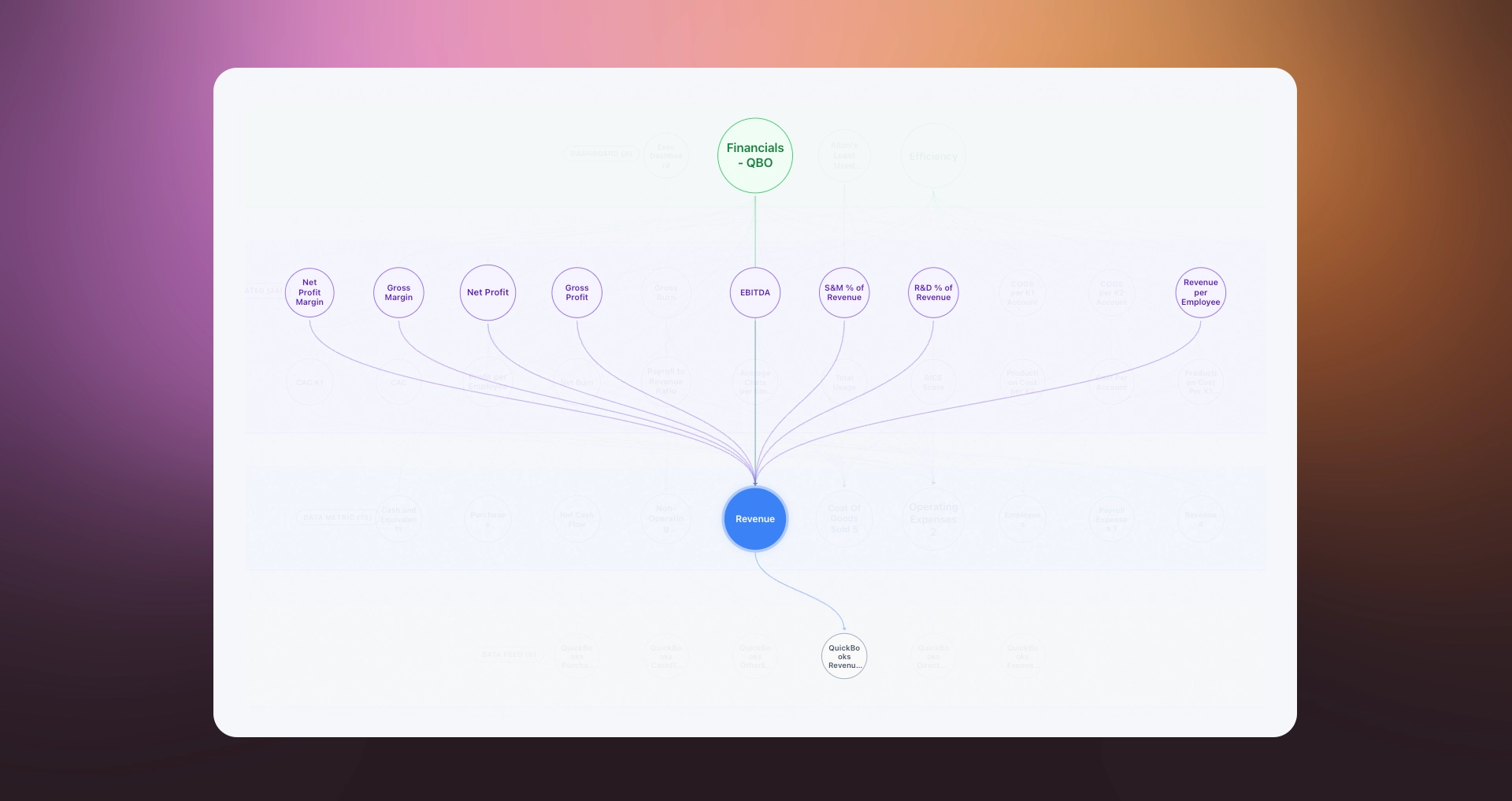
Relationships are the connections between nodes. For example, a calculated metric is built using two or more base metrics. A dashboard may include several metrics. Goals track metric KPIs. A data source powers a metric (whether that’s an API or spreadsheet for a data feed, or a direct connection to a data warehouse). A tag groups a set of related metrics, dashboards, or data feeds together.
On their own, nodes are just items in an organized list. When you add relationships, you get something much more powerful: a model of how your business measures itself and a map, or a graph, that reveals node origins and interdependencies.
🛒 The connected grocery store
In a list view, Sell-Through Rate is just another metric. In a graph view, you see the whole picture:
- It's calculated using the Units Sold and Units in Stock base metrics
- Its base metrics are fed by the “inventory” and “sales” data sources
- It's included in the “Weekly Produce Dashboard”
- That dashboard is connected to the “Spoilage Reduction” goal
- It's tagged with Operations and Inventory
Following these threads will help you understand not just the Sell-Through Rate number, but its entire context.
Four relationships worth understanding
Not all relationships are equally important. These four are the ones that will change how you work.
1. Lineage: Where does this number come from?
Lineage is the chain of origin — the path from raw data all the way to the number on your dashboard.
For a base metric, lineage is simple: a data source feeds a metric. For a calculated metric, lineage includes all the base metrics it was built from, and the formula that connects them.
Understanding lineage especially matters when something looks wrong. If your Sell-Through Rate suddenly spikes, lineage (or metric tree) tells you whether to look at the Units Sold metric, the Units in Stock metric, or the formula itself. Without this contextual information, you're just guessing.
🛒 Missing data at the grocery store
Your Revenue per Customer metric looks higher than expected this week. Lineage tells you it's calculated from Revenue ÷ Customers. You check both base metrics. Revenue is normal. Customers is unusually low. You investigate and discover that a data sync failed and only half of Tuesday's customer records came through. Lineage didn't just identify the problem. It told you exactly where to look.
2. Dependents: What relies on this?
Dependents are the flip side of lineage — instead of looking backward to origins, you look forward to consequences.
For example, if you want to change the definition of a base metric, you first need to know what depends on it. How many calculated metrics use it? Which dashboards will be affected? Which goals track against it? If you change Revenue to exclude refunds, every node associated with the Revenue metric will be impacted. That might be exactly what you want — or it might break something important.
Knowing your dependents means you can make changes confidently, with a full picture of the impact.
🛒 What depends on what
You decide to redefine Units Sold to exclude items sold at more than 30% discount. Before making the change, you check what depends on it: Sell-Through Rate, Average Unit Price, and Inventory Turnover are all calculated from it. Three dashboards use those metrics. Two goals track against them. This doesn’t mean you shouldn't make the change — but it's essential information for making it responsibly.
3. Metadata: What does this mean?
Metadata is everything that describes a metric without being the metric itself: its name, its description, its tags, its dimensions, its owner, its intended audience.
In Articles 2 and 3, we talked about the importance of naming things well and keeping dimensions consistent. This is where all of that pays off. Rich metadata is what turns a metric catalog from a technical asset into something everyone on your team can navigate and trust.
When a new team member opens your metric catalog and wants to understand Inventory Turnover, a good name tells them what it is. A clear description tells them what's included and what's not. Tags tell them which team owns it and what area it belongs to. Dimension labels tell them how they can slice it.
That's self-service. Not a training session, not a ticket to the data team — just a well-described metric that explains itself.
4. Health: What upstream or downstream conditions affect this?
Every metric in your catalog sits somewhere in a chain. Data comes in from upstream. Dashboards and goals sit downstream. Health is your awareness of what's happening at every point in that chain.
If a data feed fails to sync, every metric fed by it will show stale data. If a calculated metric has an error in its formula, every dashboard that uses it will display the wrong number. If sharing settings are incorrect, information won’t be available to the intended audience.
Health awareness isn't just about fixing problems. It's about knowing your catalog well enough to notice when something is off — then following the chain to quickly resolve issues.
Why all this matters: Self-serve and trust
Graph thinking changes changes the relationship between your team and your data.
When a metric is just a number — no description, no lineage, no tags, no documented relationships — the only person who can answer questions about it is the one who built it. Everyone else has to ask. That's a bottleneck, and it quietly undermines the goal of being a data-driven organization.
When a metric is part of a well-connected, well-described catalog, users can answer their own questions. They can see what a metric is built from. They can understand what it means. They can filter it correctly, compare it fairly, and trust what they're looking at.
That's genuine self-serve — access to data and the context to use it well.
🛒 The new manager
A new regional manager opens the Produce Dashboard for the first time. Without graph thinking, they see Sell-Through Rate: 71% and have to find someone to explain it. With graph thinking, the metric tells its own story: what it measures, what it's calculated from, which locations it covers, and what the target is. With all this information baked in, each metric provides independent, instant contextual answers.


Context is everything: The AI angle
There's one more reason graph thinking matters — and it's important.
For AI tools to be truly helpful, they need context. Ask an AI assistant a question about your data, and it can only give you a useful answer if it understands what your data means — not just what it contains.
A flat list of metrics tells an AI almost nothing. It sees numbers and names, but it doesn't know how they relate, what they're built from, which ones are trustworthy, or what they mean in the context of your business.
A richly connected metric catalog — with documented lineage, clear descriptions, consistent dimension names, explicit relationships between base and calculated metrics, and meaningful tags — tells an AI how your business works. It can answer questions like: "What's driving the drop in Sell-Through Rate in Vancouver?" not with a generic response, but with a specific, contextually-grounded one. It can trace the lineage. It can check the dependents. It can read the descriptions and understand the intent.
This is why the work of graph thinking isn't just good data hygiene. It's the foundation of a metric catalog that gets smarter over time — for your team, and for any AI you put on top of it.
🛒 One last example from our grocery store
You ask your AI assistant: "Why is Revenue per Customer lower in Vancouver this month?" If your catalog is a flat list, the AI gives you a generic answer. If your catalog is a connected graph — with lineage showing that Revenue per Customer is calculated from Revenue ÷ Customers, with both base metrics described and tagged, with the Vancouver data feed documented — the AI can actually trace the question. It checks Revenue. It checks Customers. It checks whether the data feeds are healthy. It gives you an answer specific to your business, not a suggestion to "check your data."
That's the difference between an AI that assists and an AI that actually understands.
The practical callback: Everything in this series led here
Graph thinking isn't separate from everything in Articles 1 through 3. It's the destination they were all pointing toward.
Choosing the right metrics (Article 1) ensures your catalog adds real value — not noise. Vanity metrics and poorly-defined KPIs create clutter, confusion, and an untrustworthy graph.
Defining metrics precisely (Article 2) means every node in your graph has a clear name, a useful description, a well-chosen aggregation, and a correct date field. This metadata is what makes the graph navigable for humans and readable for AI.
Building composably (Article 3) means the connections between your nodes are mathematically sound. Calculated metrics trace back to verified base metrics. Dimension and dimension members are named consistently for compatibility between related nodes. This building block thinking keeps everything aligned and organized — setting up the perfect environment for a contextual graph.
The practical work is the same work you've already been doing: name things clearly, describe them honestly, keep dimensions consistent, tag thoughtfully, document your calculated relationships. None of that is new. What graph thinking adds is the reason it matters — not just for today's dashboard, but for the intelligence of your entire catalog over time.
Quick recap
- Graph thinking is the choice to see your metric catalog as a network of connected things, not just a list of numbers.
- Nodes are the things in your system: metrics, dimensions, data feeds, dashboards, goals, tags.
- Relationships are the connections between nodes that add lineage and context to your data.
- Lineage tells you where a number comes from, and is an essential tool for diagnosing problems.
- Dependents tell you what relies on a metric so you can make changes responsibly.
- Metadata is everything that describes a metric: its name, description, tags, dimensions. This built-in context is what makes a catalog self-serve for any user.
- Health awareness means knowing what upstream or downstream conditions could affect your metrics.
- Self-serve and trust follow naturally from a well-connected catalog where users can answer their own questions.
- AI readiness is the compounding benefit. The richer your graph, the more useful any AI working with your data becomes.
- All of it — the naming, the consistency, the composability — was always building toward this.
Closing thought
You started this series learning how to pick a metric that moves the needle. You end it thinking about your entire metric catalog as a living system — where every well-named dimension, every clear description, every documented relationship quietly makes the whole system smarter.
That's not a small shift. Most organizations never make it. The ones that do find that their data stops being something the team manages and starts being something the whole organization can use.
That's the goal. And now you have the foundation to build it.
PowerMetrics Concepts Series · Article 4 of 4